TL;DR: AI companies like OpenAI run three types of crawlers: training, search and user bots. It’s enough for one of them to get blocked for your AI visibility to take a hit.
Most people check their AI visibility the same way. Open ChatGPT, ask about the company, and read the answer. The answer looks right, so the assumption is that everything works.
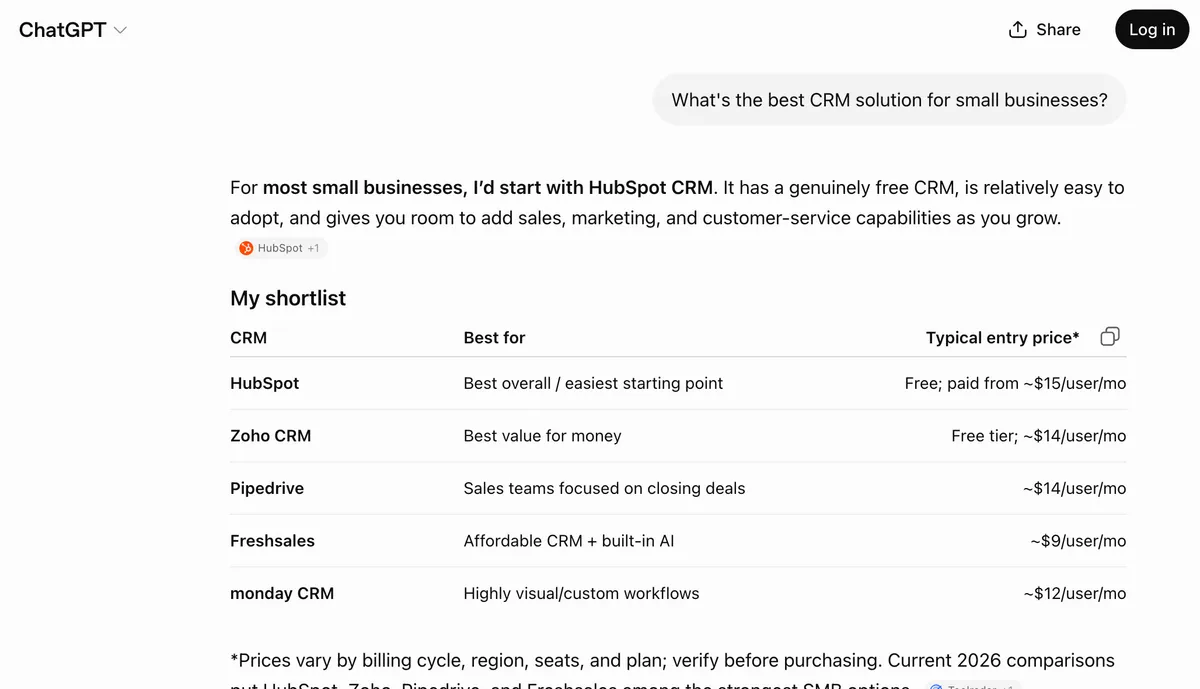 No citations, no source links. This answer came straight from the model’s training data, not a live fetch.
If you are checking AI visibility like this, you should know that this test checks only one of three crawlers AI engines use. Your site may still block the other two, and that can have a serious impact on your AI visibility.
In this guide I’ll cover how to tell if any of the three AI crawler types is blocked, why the ChatGPT test you already ran probably checked the wrong type, and what to fix in each case.
Why AI companies have three crawlers
AI companies use three types of AI crawlers. Each one does a different job, on a different schedule.
Training crawlers collect content in bulk across the whole web, and what they collect gets built into the model itself. This runs in cycles, months before anyone asks a question. Nothing you publish today reaches a model that has already finished training, so you wait for the next cycle.
Note! Training crawlers are where most AI crawler traffic comes from, by a wide margin.
Search crawlers fetch information dynamically as needed to answer specific queries. (Like OAI-SearchBot, Claude-SearchBot).
User bot crawlers (AKA live crawlers) fetch one page, once, because a user pasted a link or asked about a specific URL. (Like ChatGPT-User, Claude-User).
The traffic patterns vary. Any given page may face all three crawlers or just a single type. It is entirely possible for your content to exist within a model’s training memory without ever being fetched by a search-purpose bot.
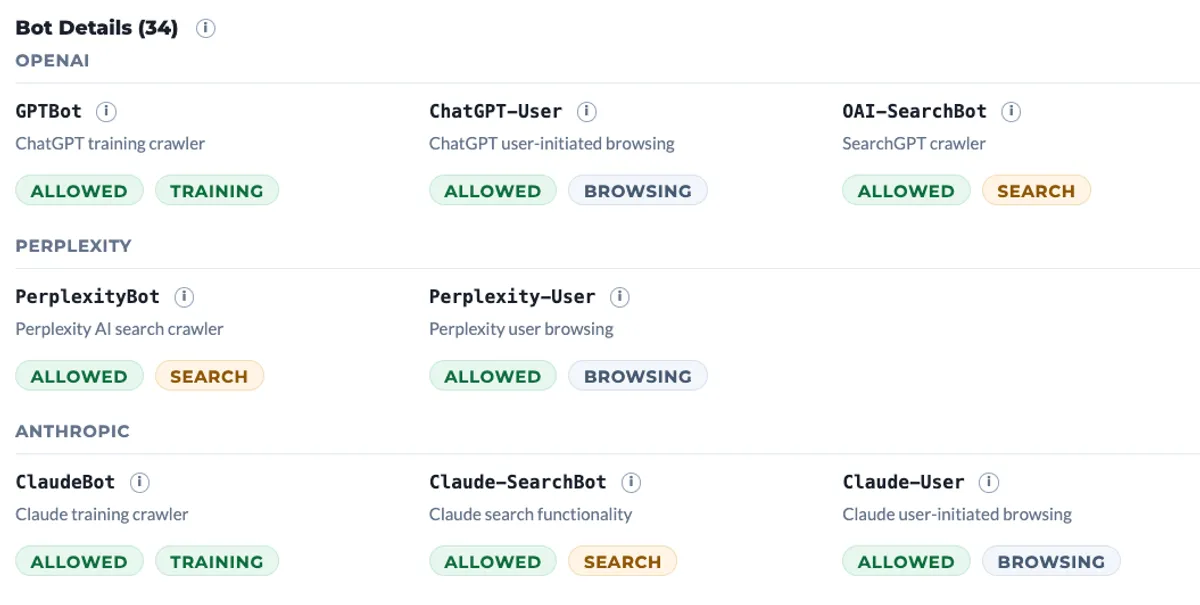 Every crawler is tagged by job. The same provider runs a different bot for each of the three.
How to tell which bot produced an answer
After you prompt an AI engine and get an answer, nothing tells you which of the three bots produced it. You can however make an educated guess by analyzing the question you asked and the answer you received.
No citations, general knowledge. That came from the model’s memory, which came from training data collected months or years ago. The training bot could be blocked today and you’d still see this.
There are source links in the answer. That’s usually the search bot.
You pasted a URL and asked about that page. That’s the user bot, opening your page while you wait.
The most accurate way to diagnose problems with one of the crawlers is to scan your site with a tool like BeSeenByAI’s Crawlability check. The scan emulates each of the different AI crawlers and lets you know if any bot was blocked.
Did you know? AI companies mostly use training bots
AI companies want to save costs, and that affects their choice of crawlers.
Running a search costs the model time and money on every request. Answering from what it already knows costs nothing extra, so it does the cheap thing by default.
There are signs that this usage of training bots is growing.
Semrush ran over a billion lines of clickstream data and measured search on 34.5% of queries as of February 2026, down from 46% in late 2024.
Profound analyzed about 700,000 ChatGPT conversations and found roughly 18% triggered at least one web search. Either way, most answers come straight out of the model with no retrieval and no link back to you.
This puts far more weight on the training bot than most people give it. Cloudflare’s network data has consistently put search-purpose crawling under 10% of AI crawler traffic, with training at the top. In August 2025 training was close to 80%. They reclassified in 2026 and that share moved depending on how mixed-purpose crawlers get counted, but search stayed under 10% in every version.
Plenty of people block training bots on purpose, and the reason is fair. Cloudflare measured Anthropic making tens of thousands of page requests for every referral it sent back. Google sat near 5 to 1, because Google has always paired crawling with a search engine that sends clicks. Training crawlers take and don’t return.
Just know what that trade costs. The bot most people worry about least is the one carrying most of their visibility, and it’s the only one you can’t fix on your own schedule. Block a search bot by mistake and you can undo it this afternoon. Block a training bot and you’ve missed a collection cycle, with no way to catch up until the next one runs, and you don’t get to pick when that happens.
Why the same page returns different content to each bot
Making sure you aren’t blocking bots is not enough.
You can allow all three bots, block nothing, and still have one of them come back with an empty page.
There are two issues we see that are most common in blocking AI crawlers bots:
-
Rules your CDN or firewall enforces. These fire on bot name and IP address, apply unevenly across bots from the same company, and never show up in robots.txt. Across 1,500+ audits on 706 domains between March and June 2026, over 96% of the blocks we found were invisible at the robots.txt layer. See what AI crawlability actually checks for the full breakdown of this layer.
-
Whether the content is in the HTML. Vercel and MERJ analyzed more than 500 million GPTBot requests and found no evidence of JavaScript execution at all.
User bots do not necessarily scan JavaScript. Sometimes they do, and sometimes they don’t. ClaudeBot downloads JS files in about 24% of requests and GPTBot in about 12%, but neither runs them. Google renders. Nobody else does. In our own scans, 70% of domains lose content this way.
Our Content Visibility audit checks exactly this, comparing what a real browser renders against what each crawler actually receives. See what Content Visibility measures for how it works.
What changes on September 15, 2026
Cloudflare blocks training and agent crawlers by default on pages that serve ads from September 15, and leaves search crawlers allowed. That default applies to new domains onboarding to Cloudflare, so for those domains it stops being your decision.
The part that hits existing customers is different. From the same date, crawlers that do both search and training get judged on all of their behaviors. So anyone already blocking training will start blocking Googlebot, Applebot and BingBot too, unless they opt out in their security settings.
Worth checking before the date rather than after.
How to diagnose it
After your scan with BeSeenByAI shows a block, look at which bot it flagged. That’s the one you work on. After that, run these steps:
Step 1. Send a real request and read what came back
A robots.txt with no disallow rules does not mean the request is getting through, so you have to send the actual request as that bot.
Then look at three things. The status code. The size of the response. Whether your actual text is inside it. All three, because a 200 with 4KB of shell HTML is a failure that looks like a pass. For exactly where to look on Cloudflare, nginx, Apache, Vercel, and other hosts, see how to check your server logs.
You’ll get one of four results, and they get collapsed into “blocked” far too often.
Blocked. A 403 or 401 to the bot. Real.
Challenged. Bot protection returns a challenge page with a 200 status. Looks fine in a status check. Contains nothing.
Empty. The request succeeds and the HTML has no content, because the page builds itself in the browser.
Bad reading. Your CDN checks bot identity by IP address, not just by name. The real bot passes. Anything sending the same bot name from a different address does not, which includes most audit tools. This is what produces alerts telling you you’re blocking ChatGPT when you aren’t.
Calling all four “blocked” sends you to the wrong file.
Step 2. Know what the block costs
Training bot. Your content stops entering future training. Existing answers keep working for a while. The cost is slow, quiet and permanent.
Search bot. You drop out of cited answers. The cost is immediate and measurable.
User bot. Someone pastes your URL and gets nothing. That person was already interested enough to bring your link into the conversation.
These fail on different clocks. A search or user block shows up in this week’s answers. A training block shows up whenever the next model ships. That’s a reason to fix all three rather than rank them. I’ve seen no evidence that a cited answer is worth more than an uncited one, and if anything, being the answer with no link attached is the better position to hold.
Step 3. Fix it in the right layer
Match the fix to the result you got in step 2.
Refused in robots.txt. Change the rule for that specific bot. Write one rule per bot instead of one wildcard covering everything, because a wildcard is how most of these blocks happened in the first place.
Refused by your CDN or firewall. Allow the bot based on its verified IP addresses, not its name. Anyone can send a request claiming to be GPTBot. OpenAI publishes its address ranges, and Anthropic started publishing theirs in April 2026 at claude.com/crawling/bots.json.
Got a challenge page. Turn off bot checks for that bot. It’s not a human, so a test designed to catch humans will fail it every time.
Came back empty. Your content isn’t in the HTML the server sends. JavaScript adds it after the page loads, and the bot leaves before that happens. Send the finished page from the server instead.
Bad reading. Confirm against your logs. If real requests are getting through, close the ticket.
Summary
Pick one bot instead of asking whether your site is blocked, because that question has no answer. Send it a real request, look at the status code, the response size and whether your text is actually in the HTML, and work out which of the four results you got. Each one gets fixed in a different place, so match the fix to the result before you change anything. Then run the same check for the other two bots, because clearing one tells you nothing about the rest.
Name the bot. Name the job you tested. Match them. Then look at what the fetch actually returned.