Every page has two versions.
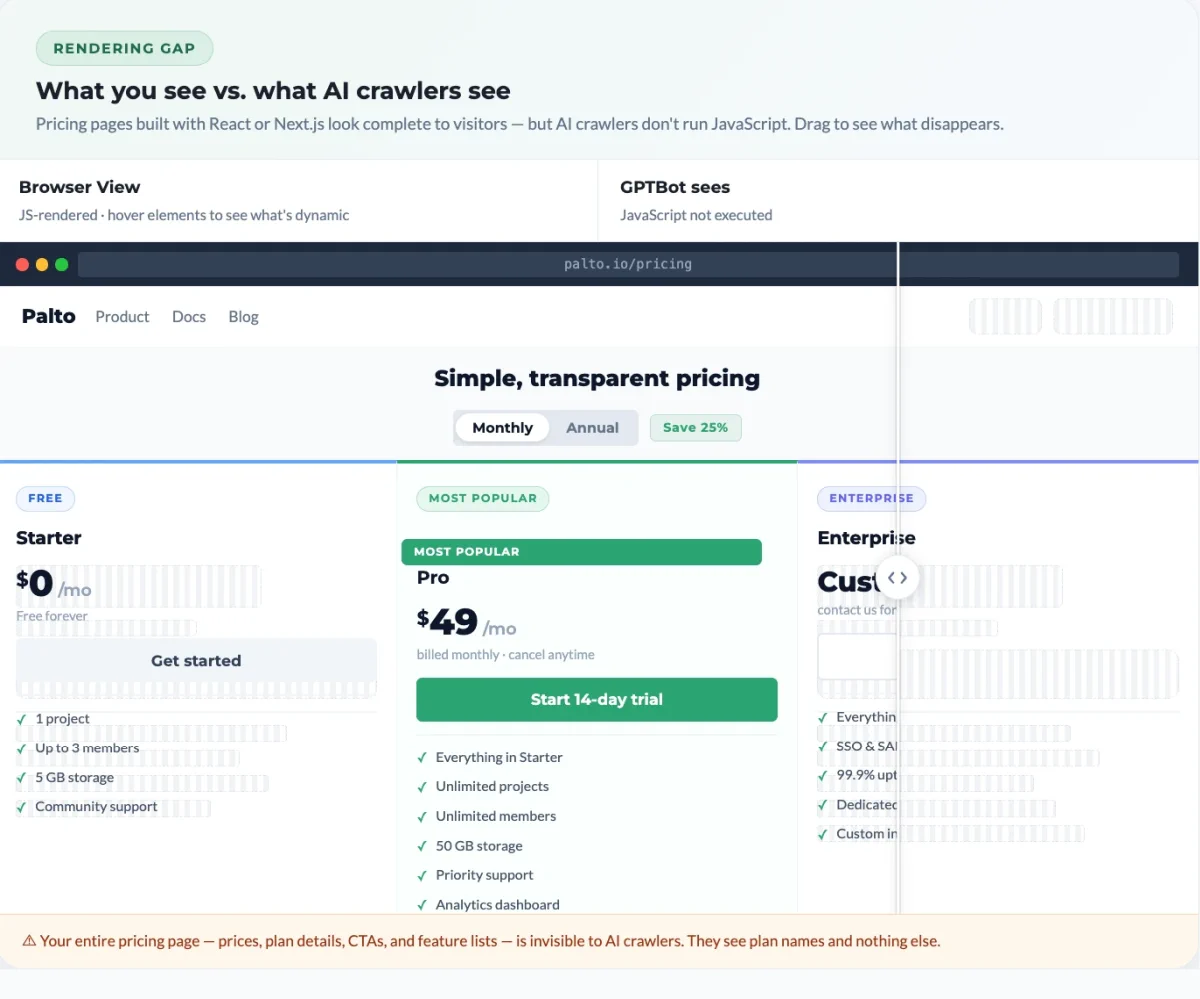
The first is what users see. A browser loads the HTML, executes JavaScript, fetches data from APIs, mounts components, and renders the final page. Pricing tables appear. Product descriptions load. The FAQ accordion populates. This is the version your designer reviewed and your team signed off on.
The second is the raw HTML response. This is what the server returns before any JavaScript runs. For server-rendered sites, this version is essentially complete. For sites built with client-side React, Vue, or Angular, it’s often a shell: navigation, a root container, script tags, and not much else.
Humans only ever see the first version. Most AI crawlers only see the second. This is common: in our own audits, 70% of sites hide part of the page from AI, and for 1 in 10, more than half the page is gone. See the full findings.
Why this is an AI problem specifically
Googlebot renders JavaScript. It runs a headless Chrome instance, waits for content, and indexes the result. This is why client-side rendered sites can rank perfectly well on Google while being completely invisible to AI systems.
The major AI crawlers behave differently. Analysis of crawler behavior across Vercel’s network confirms that none of the major AI crawlers currently render JavaScript. GPTBot, ClaudeBot, and PerplexityBot do not execute JavaScript, do not wait for rendering, and do not make second attempts. They fetch the raw HTML, extract what they find, and move on.
How it works
Content Visibility Assessment
This is the headline verdict. One of three states sits at the top: critical (above 30%), warning (5 to 30%), or good (under 5%), followed by the percentage of your content that’s invisible to AI bots and a plain-language explanation of what’s causing it.
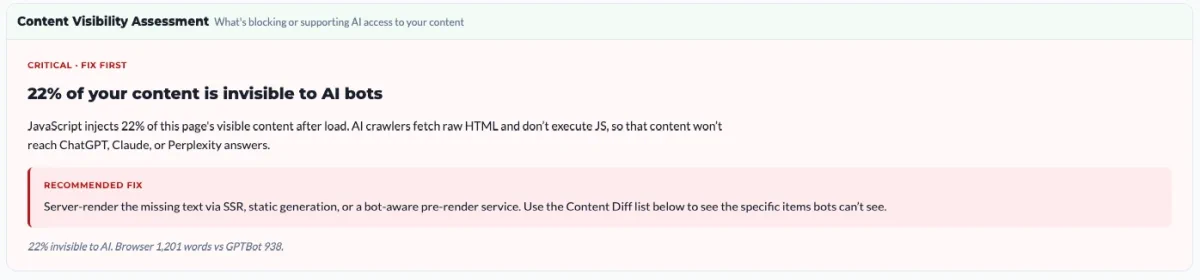
Underneath the verdict is a recommended fix tied to the specific cause we found, not a generic suggestion. For a high-impact gap, that’s typically server-side rendering, static generation, or a bot-aware prerender service, with a pointer to the Content Diff list below so you can see exactly which items the bots can’t see.
The footer of the card shows the raw numbers behind the percentage: browser word count versus bot word count. That’s the comparison everything else in the section unpacks.
Visual Comparison
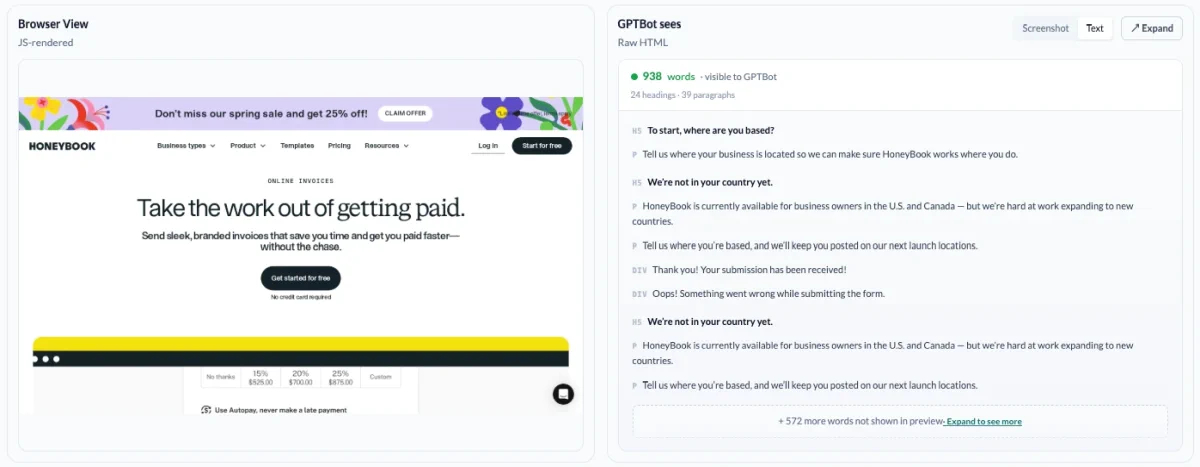
The most useful thing we can do is show you the gap, not describe it. So we put the two views side by side: a screenshot of the page as a real visitor sees it after JavaScript runs, next to the raw HTML response that GPTBot actually receives. You can toggle the bot side between a screenshot view and an extracted text view, which is what most crawlers reduce the page to anyway.
Assessment
Three numbers sit underneath: words visible to people, words visible to GPTBot, and the bot extraction gap as a percentage. The side-by-side shows you exactly which content the percentage represents.
We probe with the major AI user agents (GPTBot, ClaudeBot, PerplexityBot, OAI-SearchBot, ChatGPT-User, Claude-User) so the comparison reflects what these specific crawlers see rather than a generic bot assumption.

Deeper analysis
The Content Diff is the itemized breakdown behind the headline gap. At the top you get an impact label (high, medium, low) and two summary numbers: the count of words invisible to bots, and a plain description of important changes, like “7 headings and 5 long paragraphs appear only after JavaScript” or whether any important content was removed by JS.
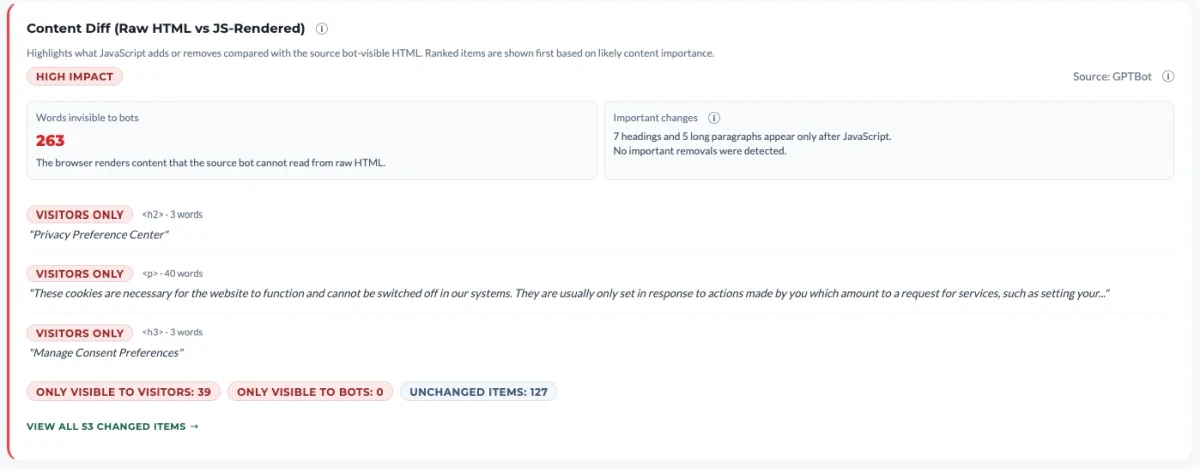
Below that is a ranked list of the actual items that differ between the two views, sorted by likely content importance rather than by where they appear on the page. Each entry shows whether it’s only visible to visitors or only visible to bots, the HTML element type (h2, p, h3, and so on), the word count, and the actual text. That last part is what makes it actionable: you’re not reading a percentage, you’re reading the literal sentences that GPTBot will never see.
Footer counters summarize the scope of the diff: only visible to visitors, only visible to bots, and unchanged items. Both directions count as risk. Content added by JavaScript is the obvious case, but content removed by JavaScript (a placeholder swapped for the real version, for instance) creates extraction mismatches just as easily.
Layout & interaction stability · field data
The visibility gap is one half of the picture. The other half is what happens during the moments a crawler is on the page. We pull Core Web Vitals field data, specifically Cumulative Layout Shift (CLS) and Interaction to Next Paint (INP), to flag pages where content moves, swaps, or appears late enough that a crawler may snapshot the wrong version.
High CLS often means content is being injected or repositioned after the initial paint. A crawler that captures the page at the wrong moment gets a partial or rearranged version of your content. High INP means the page is slow to become interactive, which correlates with heavy client-side rendering and longer windows where the DOM is incomplete.

Fixing Content Visibility
The gap between what users see and what GPTBot, ClaudeBot, and PerplexityBot can read is invisible in any traditional SEO audit, which is why pages that rank well on Google routinely fail to surface in ChatGPT, Claude, or Perplexity answers.
The Content Visibility check measures that gap directly: it puts the rendered and raw versions side by side, lists the exact sentences that go missing, and uses real-visitor field data to flag pages where crawlers may capture the wrong moment of the page. Anything above a 5% gap is worth a look. Anything above 30% is the highest-leverage fix on the page.