If AI systems can’t crawl your site, they can’t cite you.
This guide walks through what BeSeenByAI’s crawlability feature actually does, what each part of the report means, and how to act on what you find.
Why is AI crawlability different from regular SEO crawlability?
Before LLMs, crawlability referred only to whether Googlebot can reach my pages and index them. AI access comes from a fragmented set of bots run by different companies for different purposes: training crawlers, real-time search agents, research bots, agent browsers fetching pages on behalf of a user.
Googlebot is a single system with a published policy. AI access comes from a fragmented set of bots run by different companies for different purposes: training crawlers, real-time search agents, research bots, agent browsers fetching pages on behalf of a user.
Indexing isn’t the goal, citation is. SEO crawlability is about getting into the index so you can rank in a results page. AI crawlability is about being reachable at the moment an AI system is assembling an answer. Some bots fetch in real time to answer a live query. Others crawl ahead of time to feed a training set.
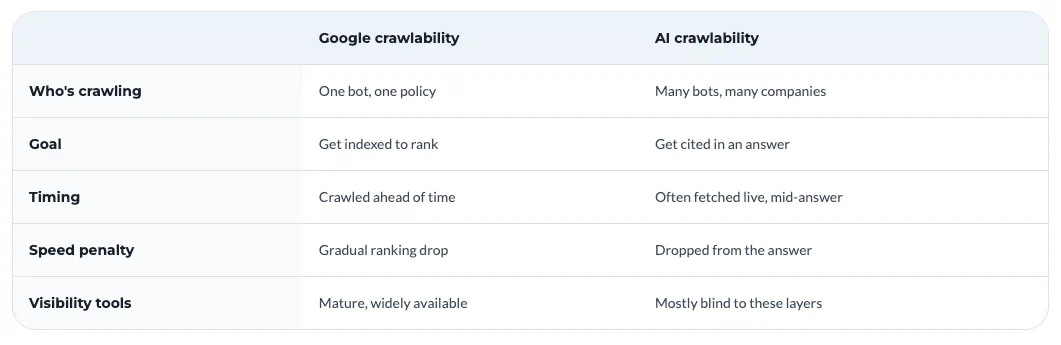
Speed is a yes or no question. With Google, slow pages hurt rankings gradually. With AI systems pulling from multiple sources to compose a single answer, slow pages get dropped. You either responded in time to be included, or you didn’t.
Infrastructure does more of the deciding. A growing share of AI crawl traffic gets blocked before it reaches the application layer, by CDNs, WAFs, and bot management features that classify AI crawlers as scrapers by default. Your robots.txt is a polite request to the bot. Your CDN is a hard decision about whether the bot ever talks to you.
You can be perfectly crawlable for SEO and substantially invisible to AI, and most existing tools won’t tell you because they aren’t looking at the layers where the difference lives.
How BeSeenByAI checks crawlability
The audit runs four distinct probes against your site, each catching a different class of invisibility.
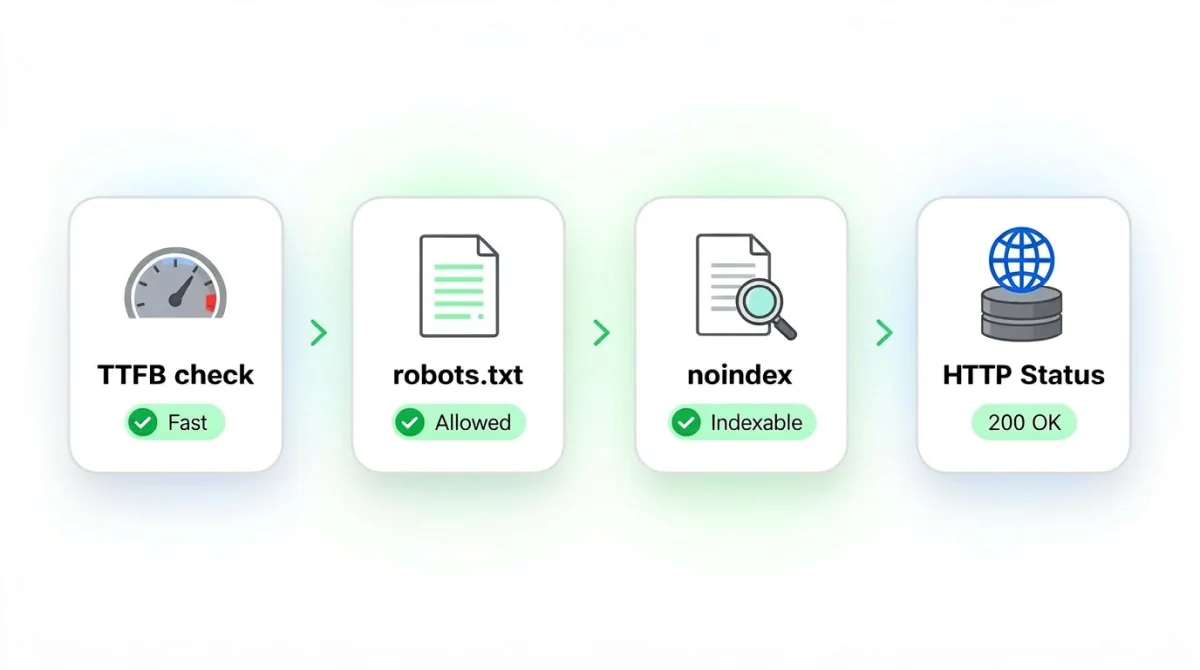
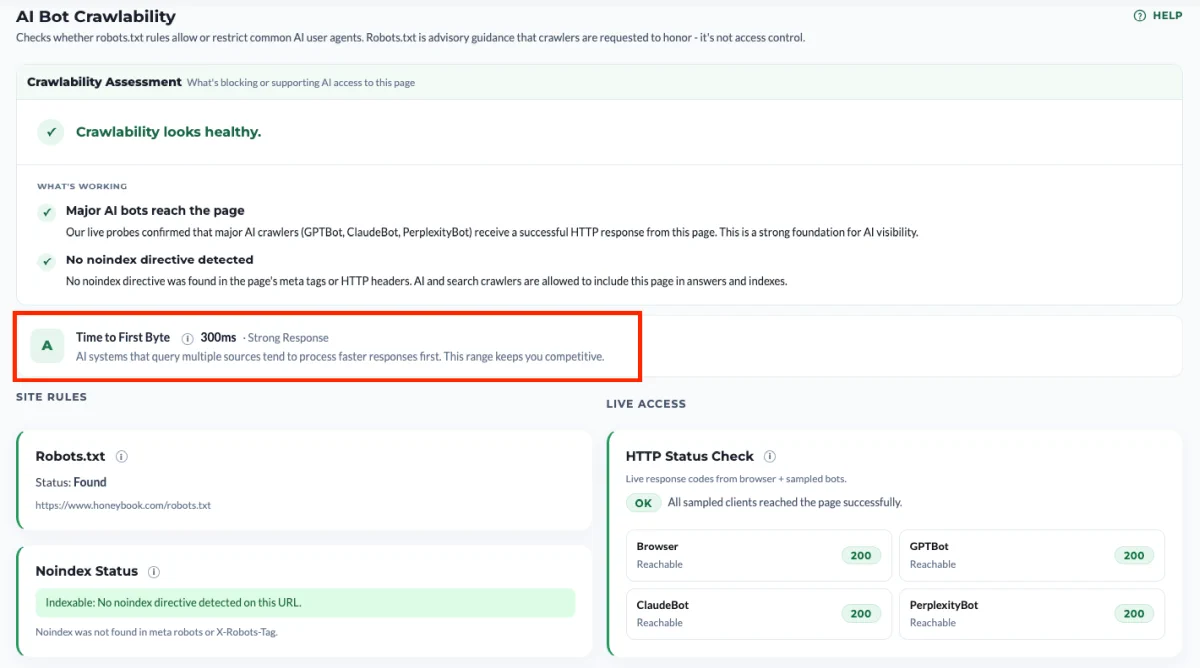
TTFB check. We measure Time to First Byte: how long your server takes to start responding once the request is made. AI systems that query multiple sources tend to process faster responses first, so this range keeps you competitive. A slow TTFB doesn’t block a crawler outright, but it makes you a less attractive source when an AI system is racing to assemble an answer from several pages at once.
robots.txt policy check. We retrieve your robots.txt file and test it against 34 AI user agents from major providers. This tells you what your stated policy is, per bot.
Indexability check. We look for noindex directives in meta robots tags and X-Robots-Tag headers. A page can be fully crawlable and still excluded from indexing, so this is a separate layer worth checking on its own.
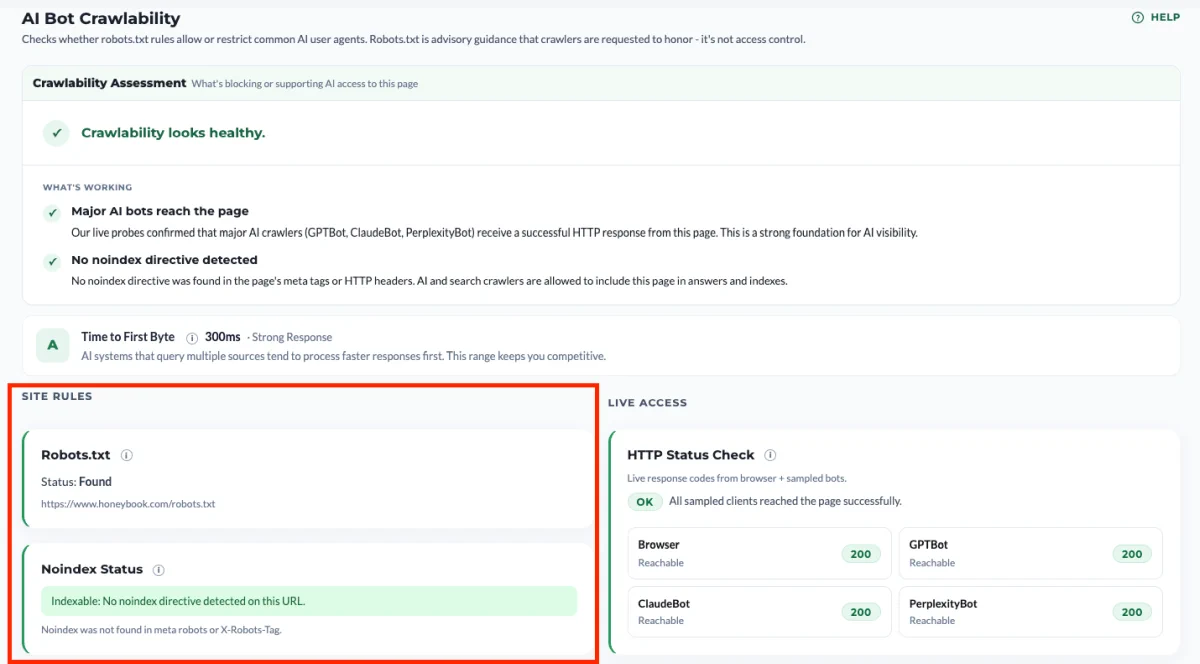
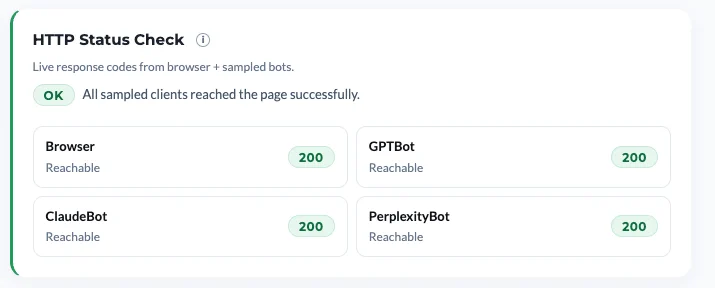
HTTP Status Check. For Browser, GPTBot, ClaudeBot, and PerplexityBot, we make a live request to your site and record what your server actually returns. This tells you what your infrastructure is doing in practice, which is often not the same thing as what your robots.txt says.
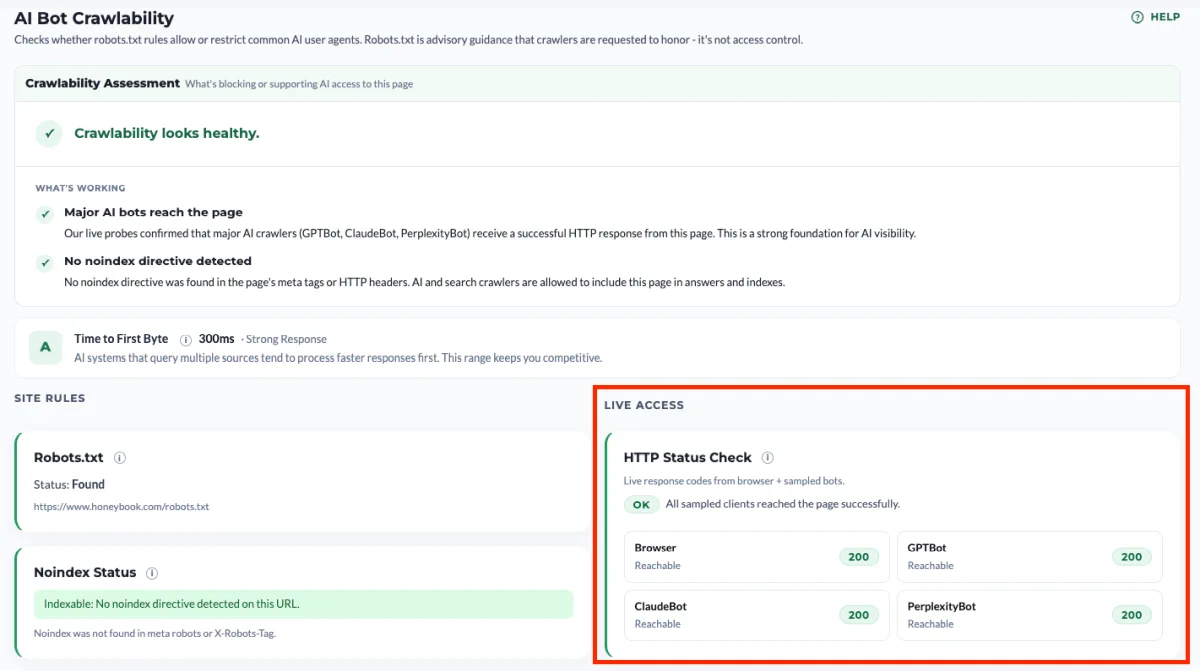
Make sure all tests pass
It’s enough to get one of these four tests to fail for your site to be invisible to AI crawlers and consequently not appear in LLMs.
3 types of AI crawlers
Not every AI bot does the same job. The report groups them into three categories so you can make different decisions about each.
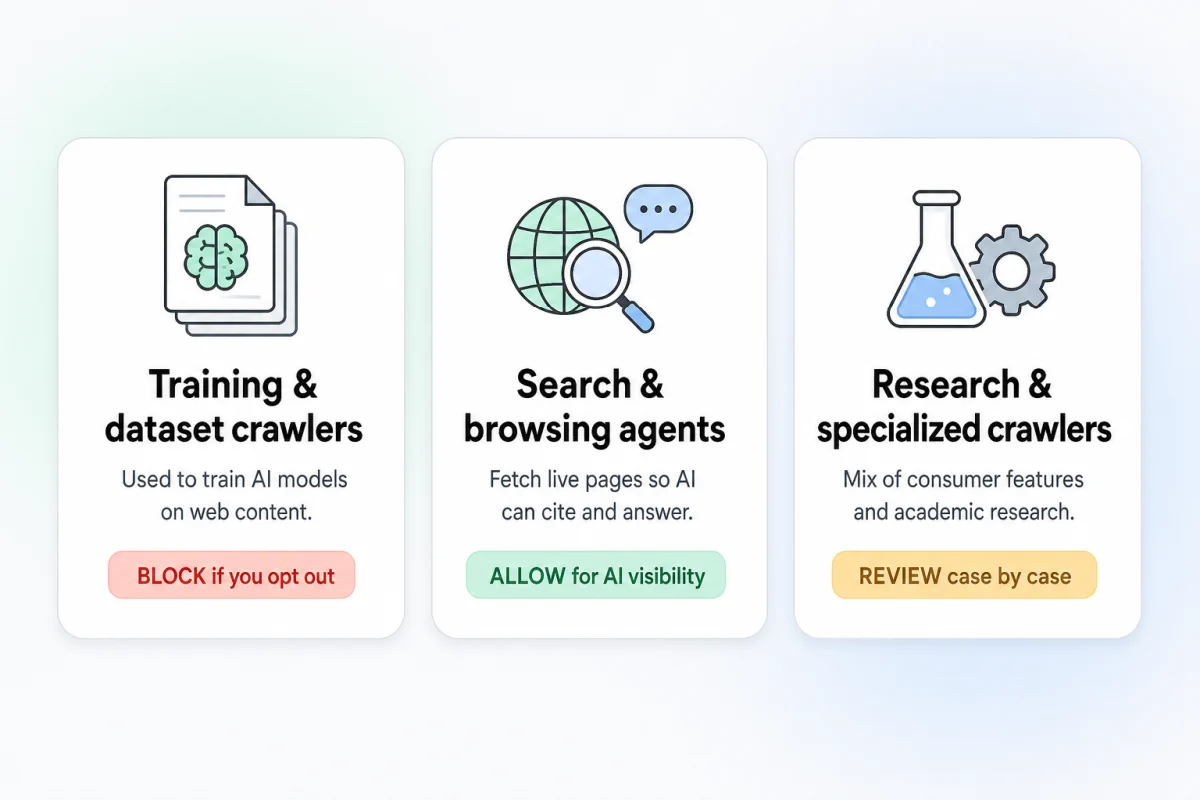
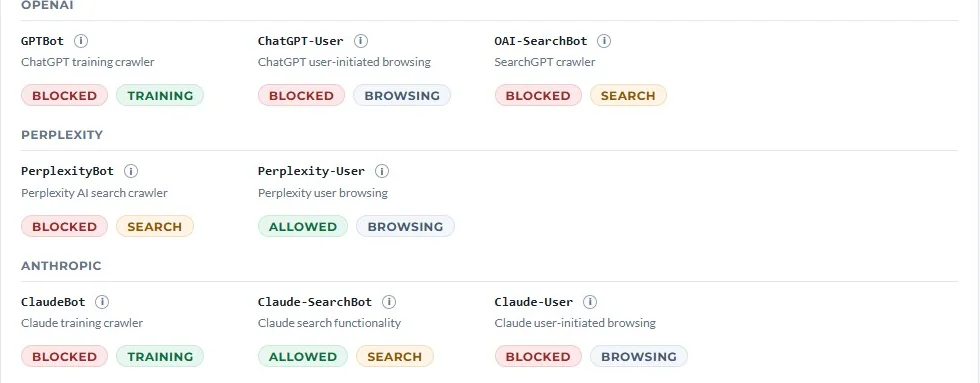
Training and dataset crawlers. GPTBot, Google-Extended, anthropic-ai, CCBot, Amazonbot, FacebookBot. These feed model training datasets. Blocking them is a legitimate choice if you don’t want your content used for training, but it should be a deliberate choice, not an accidental one.
Search and browsing agents. PerplexityBot, OAI-SearchBot, ChatGPT-User, YouBot. These fetch pages in real time to answer user queries right now. If you want to be cited when someone asks ChatGPT or Perplexity a question, these are the bots that have to reach you. Blocking these is almost never what you actually want.
Research and specialized crawlers. ClaudeBot, Applebot-Extended, Bytespider, Diffbot, Meta-ExternalAgent. These power a mix of consumer features and research uses.
A blanket block often blocks the search agents along with the training crawlers, which means cutting yourself out of AI search results while trying to protect against training. The per-bot view in the report lets you see exactly which category each block falls into. For how to tell which bot type actually produced a given ChatGPT answer, and what a block in each one costs you, see training, search, and user bots.
The HTTP Status Check, and why it’s the part most audits miss
robots.txt is a request to compliant crawlers, not a technical control. Whether a crawler actually reaches your page is decided by your infrastructure: your CDN, your WAF, your hosting provider’s bot mitigation, any security plugin running at the application layer.
These systems do not consult your robots.txt before making decisions. On Cloudflare, for instance, firewall rules evaluate before robots.txt is ever fetched. If a WAF rule blocks ClaudeBot at the edge, your robots.txt Allow directive is irrelevant because the bot never gets that far.
The HTTP Status Check probes this layer directly. We make a live request as Browser, GPTBot, ClaudeBot, and PerplexityBot, and report what your server actually returns.
How to read the codes:
- 2xx — Reachable. The crawler gets through.
- 3xx — Redirected. Also fine, though we surface a note when the final URL differs from what you entered.
- 4xx — Warning. Something is rejecting the request. Verify it’s intentional.
- 429 — Critical. Rate-limited or soft-blocked. We surface the Retry-After value when your server provides one.
- 5xx — Critical. Server error specific to that user agent, almost always a sign of runtime blocking.
- Timeout / no response — Unavailable. Could be intermittent, worth re-running.
The codes that matter most are 429 and 5xx returned to AI user agents while Browser gets a healthy 200. That pattern is the runtime mismatch, and it’s the single most common hidden crawlability failure.
The mismatch finding
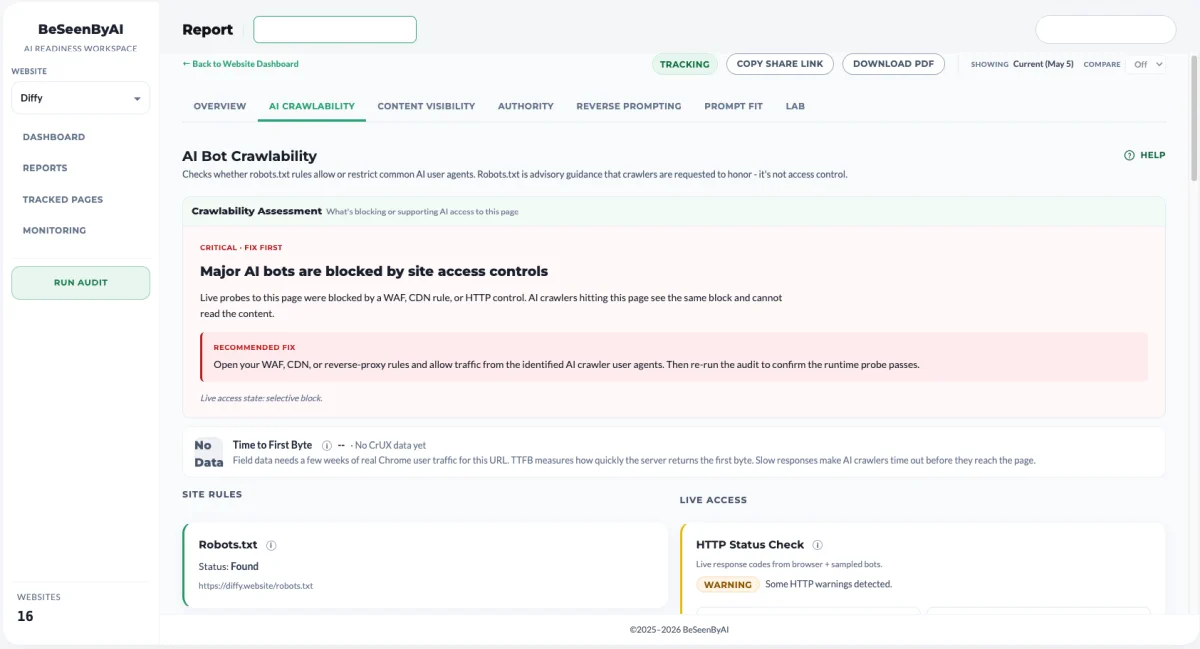
When the robots.txt check and the HTTP Status Check disagree, the report flags it as a mismatch. Your robots.txt allows the bot. Your server rejects the bot. The two layers are out of sync.
Common causes:
- Cloudflare Bot Fight Mode, which is on by default on every plan and classifies many AI crawlers as automated traffic to be challenged or blocked.
- Custom WAF rules targeting “AI scrapers” or generic bot user-agent patterns, often shipped as one-click defaults.
- Managed WordPress hosts running platform-level bot mitigation that customers can’t see or toggle through the admin portal.
- Security plugins with built-in blocklists that include AI bot user agents.
- Rate limiters tuned for human traffic that flag legitimate crawl bursts as abuse.
- IP-based blocks on cloud ranges, which catches AI crawlers because they run from cloud infrastructure by definition.
The report doesn’t try to guess which of these is the cause on your site. It tells you the mismatch exists. Finding the source is the next step.
The four verdict states
The report rolls everything up into one of four top-level verdicts.
Good. robots.txt allows the major AI crawlers, HTTP responses are healthy, TTFB is within a competitive range, and no surprising noindex directives are present. Recheck periodically as new bots emerge and as your infrastructure changes, but nothing needs attention today.
Warning. Some selective blocking is present, some 4xx responses are showing up, or TTFB is slow enough to put you at a disadvantage against faster sources. Often legitimate, sometimes not. Open the report and confirm.
Mismatch. robots.txt says allow, runtime says no. This is the most actionable verdict because it almost always reflects an accidental block. Fix the runtime layer.
Risk. Significant blocking at the policy layer, widespread critical responses at the runtime layer, or both. If unintentional, AI visibility is meaningfully suppressed right now.
What to do with the findings
Crawlability is an access-layer check: it tells you exactly what to change, but these are configuration edits you make yourself — there’s no page content to draft here. (Content gaps elsewhere in your report are different: Optimizations writes those fixes for you, grounded in your own page.) The next step depends on which layer the problem lives at.
If the robots.txt policy is the issue, edit the file. Remove the unintended Disallow lines. If you want to block training crawlers but keep search agents, use per-user-agent rules rather than a wildcard block. The four example patterns in the report (global block, no file, selective block, wildcard-then-allow) cover most of what you’ll need.
If the HTTP Status Check shows a runtime block, start by figuring out which system is responsible. Run curl -I against your URL with an AI bot user agent and look at the response headers. CF-Ray means Cloudflare is in the path. Server and x-powered-by will often name the host. Then:
- On Cloudflare: check Security → Bots for Bot Fight Mode and Security → WAF for custom rules targeting AI user agents. If you have AI Crawl Control, it gives per-bot visibility into edge decisions.
- On managed WordPress: check bot redirect settings and any security plugins with default blocklists. If nothing in the customer-facing controls explains the block, open a support ticket with curl evidence.
- On your own infrastructure: review WAF rules and rate limiters for cloud-IP-range blocks or generic “automated traffic” patterns. AI crawlers run from cloud IPs, so generic cloud blocks catch them.
If the noindex check flagged something, find the source in your CMS or templates. WordPress, Webflow, and most static-site generators have visible toggles for noindex. The harder cases are CDN-injected X-Robots-Tag headers, which require checking your edge configuration.
If TTFB is slow, the fix is on the performance side rather than the access side. Start with the obvious levers: enable caching at the edge, put a CDN in front of your origin if you don’t have one, and check whether your server is doing expensive work on every request that could be cached or deferred. Database queries on uncached pages, unoptimized images blocking the initial response, and origin servers in a single region serving global traffic are the usual culprits. The goal isn’t to win a speed benchmark, it’s to respond fast enough that an AI system assembling an answer doesn’t move on without you.
When to re-run the audit
Crawlability isn’t a set-and-forget check. There are two main situations worth re-running it.
After a change happened. Anything that touches how requests reach your site can shift the results, including:
- A change to robots.txt
- Enabling, disabling, or reconfiguring a WAF or bot management feature
- Migrating hosting providers or adding a CDN
- Installing a new security plugin
After the audit surfaces an HTTP issue. Runtime blocks aren’t always permanent. A 429 or 5xx returned to an AI bot can reflect a temporary rate limit, a transient WAF decision, or a brief origin hiccup rather than a standing rule. Re-running the audit confirms whether the issue is consistent or whether it cleared on its own, before you start hunting for a cause that may not exist.