We built BeSeenByAI to offer a more reliable and confident way to run GEO workflows that work and generate traffic growth from LLMs.
In this article, we cover the entire seven-step GEO loop. The guide shows the full workflow on a real page, from the CRM platform HoneyBook. You’ll see the actual scores, prompts, and changes, so you can do the same thing on your own page.
What GEO Is, and What It Isn’t
GEO is the work of making your content reachable, readable, and answer-shaped for AI systems that generate responses by citing sources.
GEO stands for Generative Engine Optimization. The alternatives you’ll bump into most are AEO (answer engine optimization) and AIO (artificial intelligence optimization).
Whether you call it GEO, AEO, or AIO, you’re doing one thing: making your content the source an AI system reaches for when it answers a question.
Most platforms calling themselves GEO tools only do one thing: track whether you got mentioned. Tracking is useful, but it’s a thermometer, not a treatment. Knowing you weren’t cited doesn’t tell you why. The why almost lives in technical and structural issues most marketers have never been asked to think about.
GEO splits into two distinct problems.
Causes: can crawlers reach your page, see your content, and is the page positioned to answer the prompts you care about?
Symptoms: are you getting cited, where, and for which prompts? This guide is about causes, because fixing causes is the only thing that changes symptoms.
The GEO Steps
Seven steps, in this order:
- Initial scan — the technical foundation
- Content Coverage — see what topic the page explains, which concepts are weak or missing, and where to improve it so AI systems can use the page with confidence
- Prompt fit — score the page against a target prompt and apply the fixes
- Prompt discovery — see a single ranked list of realistic prompts grouped by what the page is doing (already strong, close to winning, needs content work, or a gap), each with a recommended action
- Prompt tracking (done manually or using another software) — measure citations over time
- Measurement — checking analytics to see that actual LLM traffic growth happens following the changes you’ve made.
- Agentic Browsing — Can an AI agent act on the page?
Step 1: Initial Scan
Before any of the prompt work matters, the page has to be technically visible to AI crawlers. The initial scan in BeSeenByAI covers crawlability, content visibility, authority, and speed across all the major AI crawlers.
This step isn’t optional. Across our own audits, 70% of sites hide part of the page from AI, and 11.6% block at least one AI crawler outright. Neither shows up if you only check whether ChatGPT can quote you. See the full findings.
If you’re working on a whole site rather than a single page, start with a Website Audit in the app (Pro and Agency). It discovers and ranks your pages, audits them in one run, and gives you a site-level score with the top issues surfaced first, so you can see which pages to run this loop on before you dive into any one of them.
I’m going to keep this section short, because we cover the scan in depth in a separate post: How to Read Your AI Readiness Report.
Read it alongside your first audit.
The short version: If no technical issues show up in the scan, you are good to continue to the optimization part. Otherwise, you need to first fix any critical issue that arises, because otherwise your page won’t likely be cited, no matter how good your content.
See screenshot below:
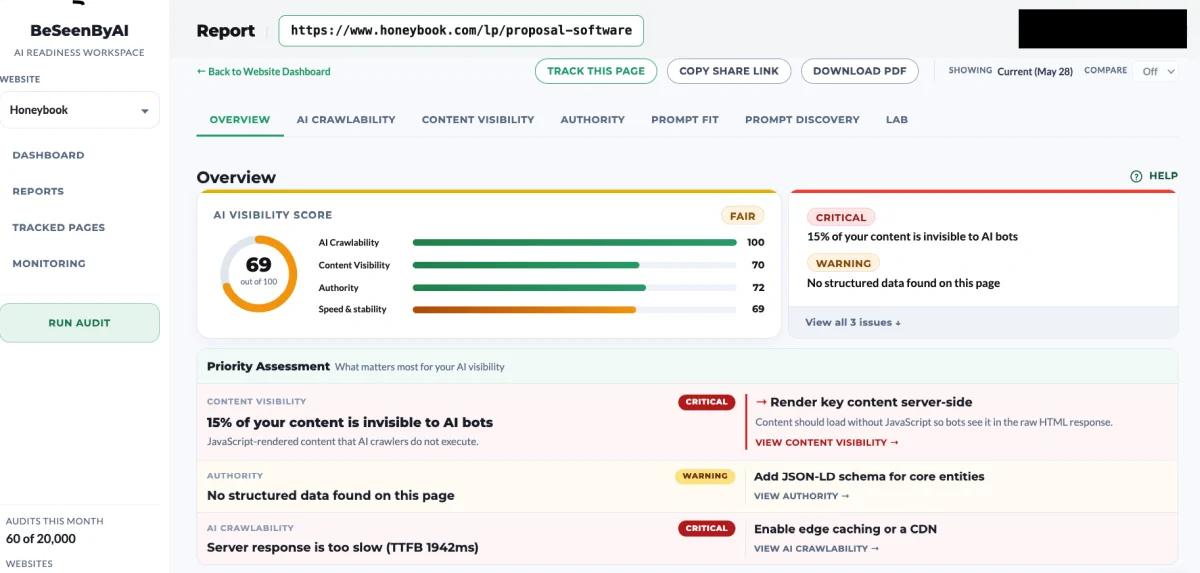
For HoneyBook, the scan came up with a score of 69, and issues related to Content Visibility and AI Crawlability.
If your scan is not clean, stop here, fix the technical issues, and come back. Optimizing a page that AI can’t reach is a waste of effort.
Step 2: Content Coverage
The scan tells you whether AI can reach and read the page. Content Coverage tells you whether the page actually explains its topic well enough for AI to use it.
The tool figures out what topic the page is explaining, then checks how completely it covers it. You get a topic confidence score, a count of the expected questions the page answers, a count of the concepts it integrates, and a ranked list of priority improvements.
Content Coverage runs on a single page. If you started with a Website Audit, this is where the site-level view pays off: the audit already ranked your pages, so you run Content Coverage on the pages that matter most instead of guessing. For this guide, that page is the HoneyBook proposal software page.
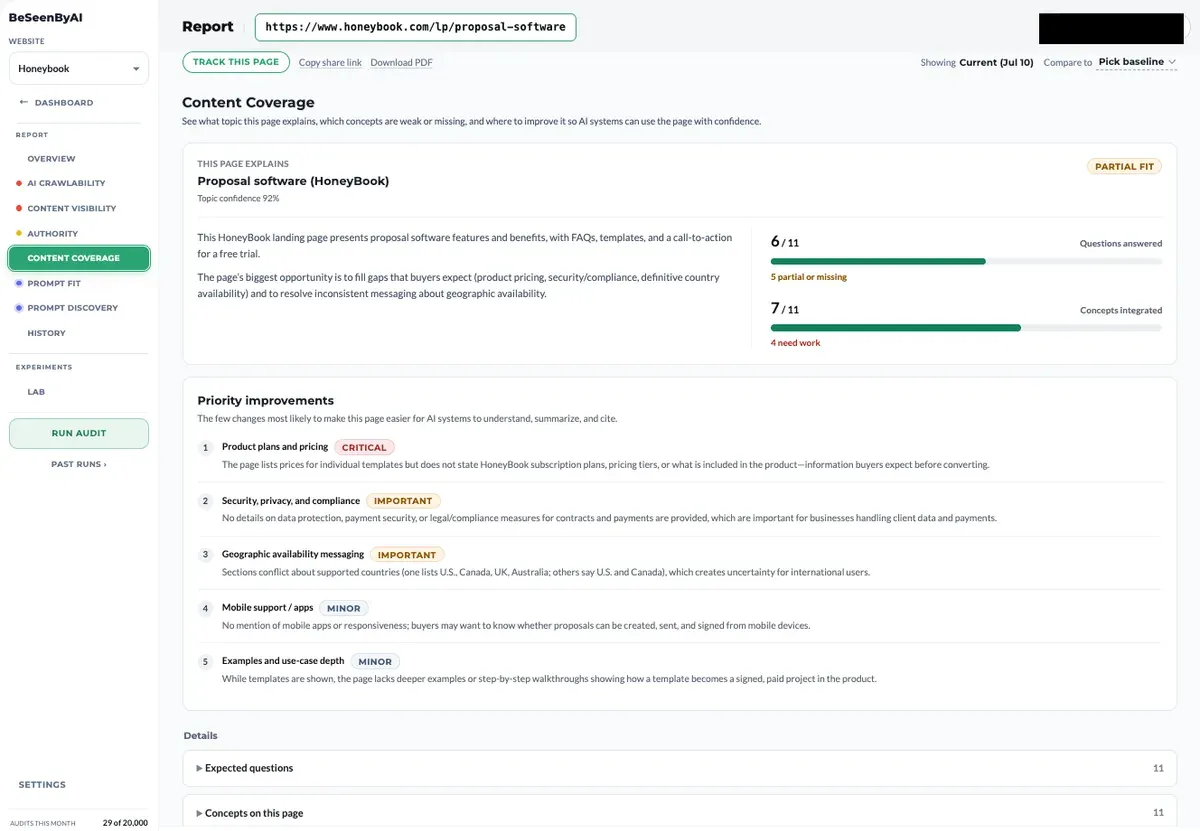
Two numbers do most of the work: how many of the expected questions the page answers, and how many of the core concepts it integrates. Then come the priority improvements, a short ranked list of the changes most likely to make the page easier for AI systems to understand, summarize, and cite, each one explaining what’s missing and why it matters.
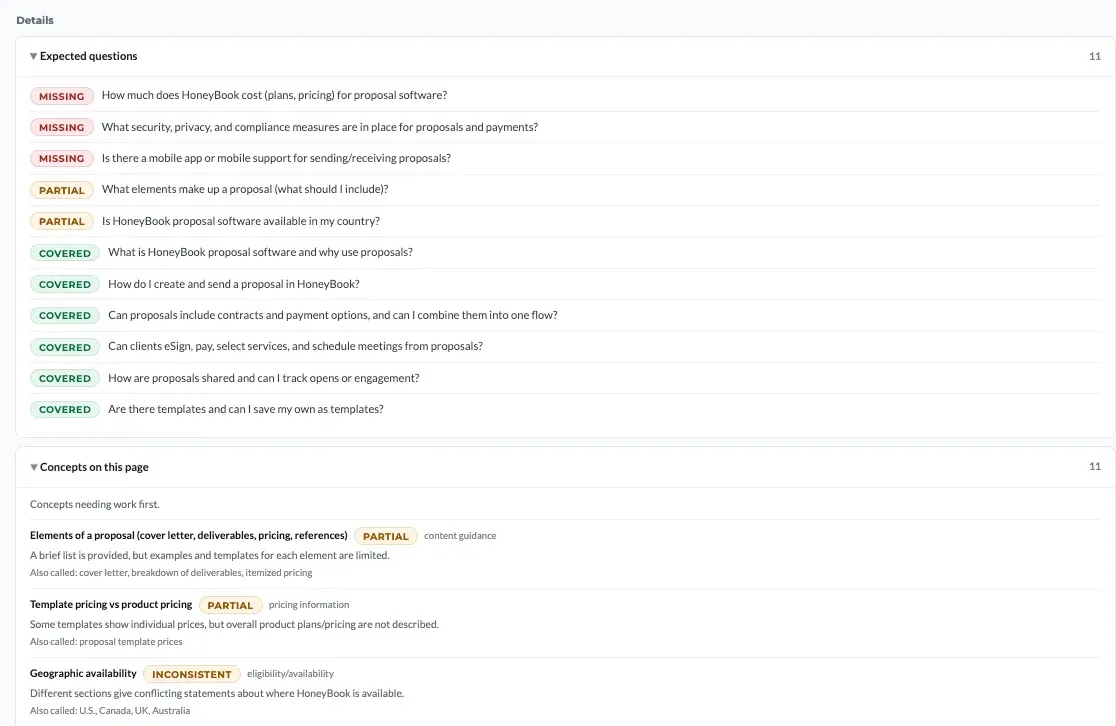
None of these issues show up in a technical scan, because the page renders fine. The problem is different: an AI system reading the page can’t find complete answers to the questions it expects the page to cover.
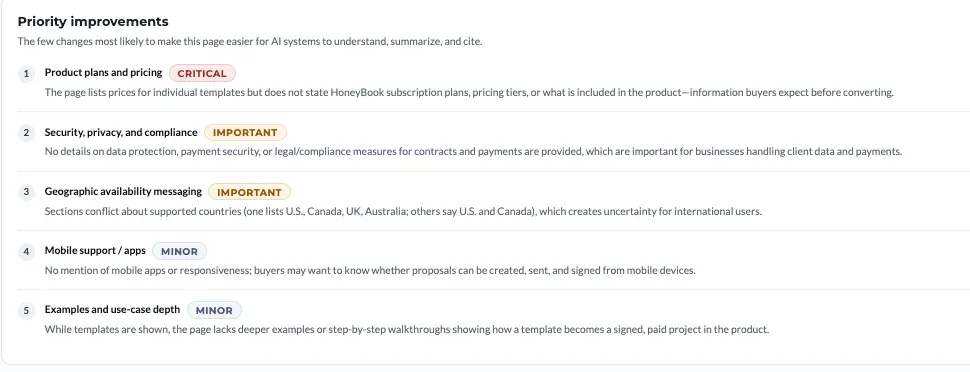
Fix the important items first, re-run Content Coverage, and move on when the questions-answered and concepts-integrated counts improve. You don’t need a perfect score. You need the page to explain its topic completely enough that an AI system can summarize and cite it with confidence.
Across this whole loop (Content Coverage gaps, the Prompt Fit and Prompt Discovery edits below, and the schema fixes from the scan) you don’t have to write the fixes from scratch. Optimizations drafts each one from the content already on your page, flagging any fact the page didn’t supply so you confirm it rather than invent it.
Step 3: Prompt Fit
After fixing everything that came up in the scan, you can move on to the optimization stage.
Here, you know the page is reachable and readable, and you need to figure out if it has the best answer to the prompt you are intending it for.
Prompt Fit takes a target prompt and scores the page against it. The score is a gap analysis: what the prompt expects, what the page provides, and what’s missing.
Worth running even on pages you’re confident about: in our own Prompt Fit runs, only 55% of pages scored a “Strong” answer verdict. The rest were partial, weak, or unanswerable, and a page rarely reveals which bucket it’s in until you test it against a real prompt.
Choosing the target prompt
The first decision is which prompt to optimize for. A good target prompt has three qualities:
- It’s specific enough that an AI system would generate a substantive answer rather than a list. “Best CRM” is too broad. “What is the best CRM for event planners” is workable.
- It’s a prompt the business actually benefits from winning. Vanity prompts get citations no one searches.
- It’s a prompt the page has a structural chance at. Pick prompts that match what the page is about.
For HoneyBook, I picked this prompt as my first target:
“Why choose HoneyBook as the proposal software for freelancers?”
That’s specific, business-relevant, and matches the page type.
The specific service that the page is targeting is “CRM for event planners”. Given this, the page must give a good enough reason for event planners to choose HoneyBook as their solution.
Running Prompt Fit
I dropped the URL and the target prompt into BeSeenByAI’s Prompt Fit tool.
See screenshot below:
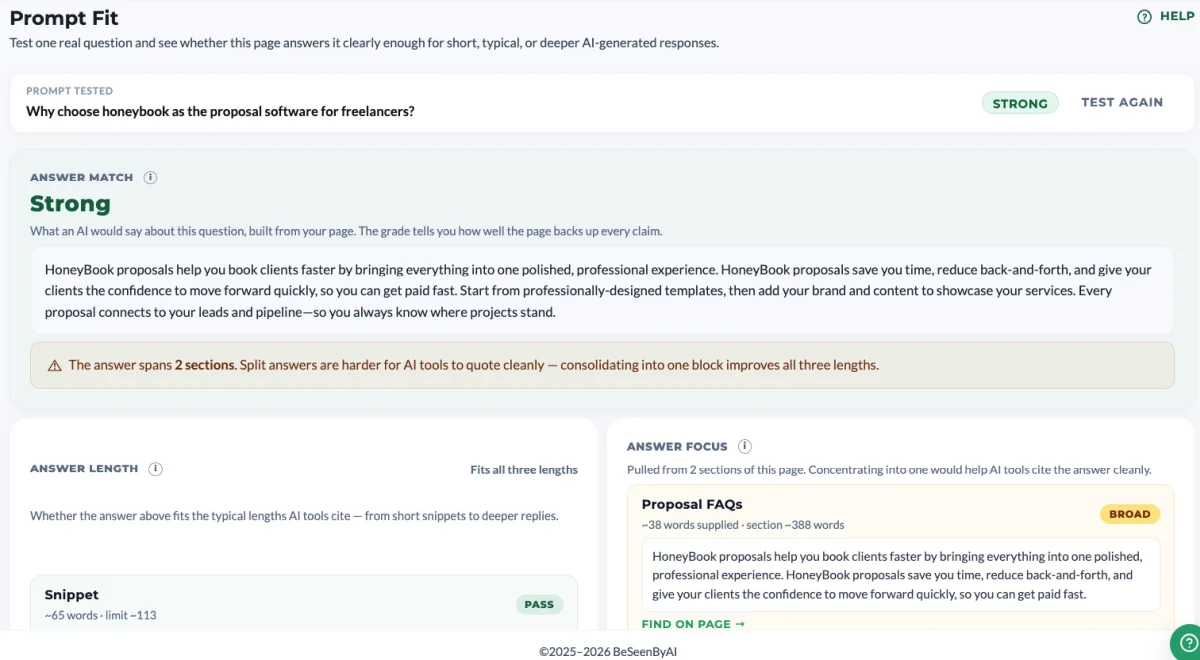
The tool returned an initial answer match and a breakdown of what was working and what was missing.
The breakdown surfaced that the answer spans over 4 sections. It suggested adding an FAQ that directly answers this query, in order to give AI a single clean block to cite.
Step 4: Prompt Discovery
Prompt Fit optimizes for the prompt you chose. Prompt Discovery asks the inverse question: what prompts is this page now positioned to answer, including ones you didn’t target?
This is where single-page optimization turns into content strategy. The tool analyzes the page and surfaces a single ranked list of realistic prompts: Already strong cards (prompts the page already answers well, for validation, to protect what works), Close-to-winning, Needs-content-work, and Gap cards (realistic prompts the page hasn’t fully closed yet, each with a concrete recommended content action to move it up a tier), plus the supporting evidence that explains why each match is plausible.
See screenshot below:
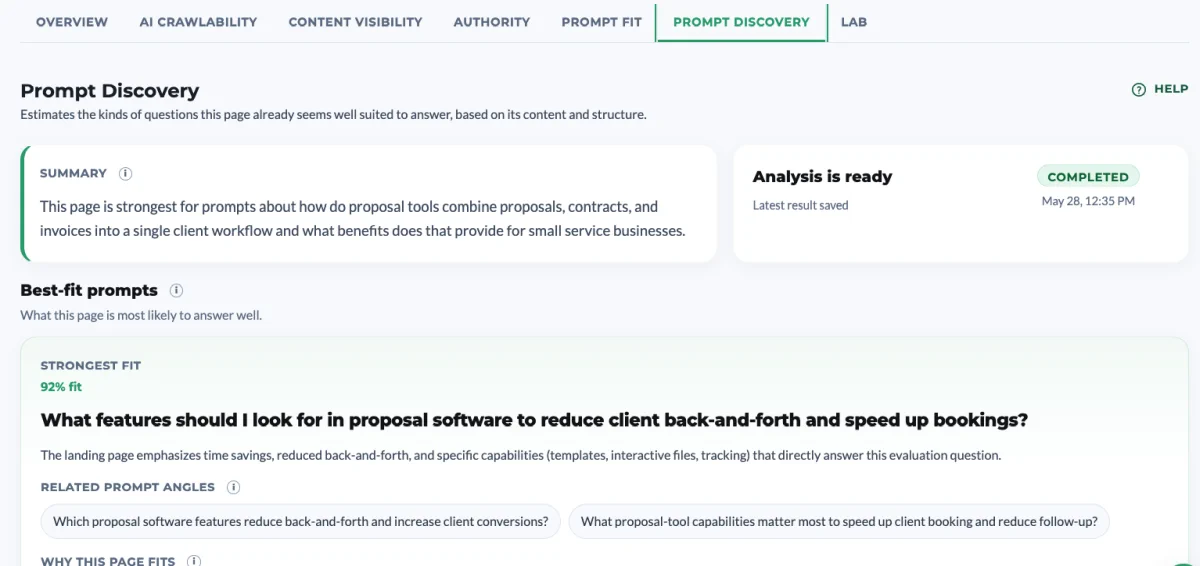
For HoneyBook, Prompt Discovery surfaced these prompts:
- What features should I look for in proposal software to reduce client back-and-forth and speed up bookings?
- How do proposal tools combine proposals, contracts, and invoices into a single client workflow and what benefits does that provide for small service businesses?
- How do interactive proposals let clients select services, eSign contracts, pay invoices, and schedule meetings from one link?
- How can I use proposal templates effectively across different client types to save time while keeping proposals personalized?
- How does proposal open-tracking work and how should I adjust follow-up timing when I know a client has opened a proposal?
The page also offers a valuable recommendation as to how to improve the content:
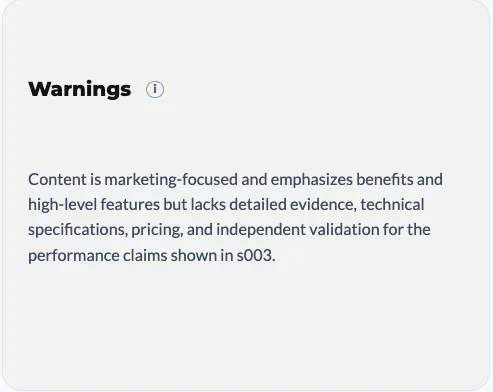
It surfaces prompts the page only partially addresses. This could be highly valuable as a way to identify important messaging we want to fine tune:
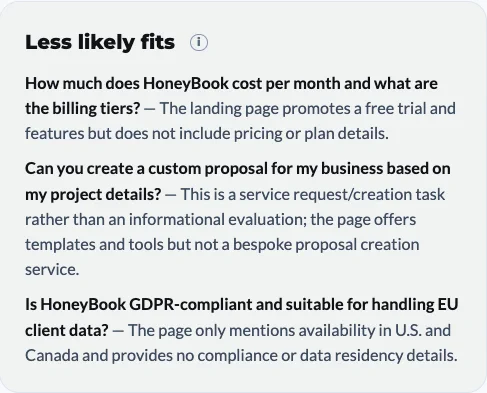
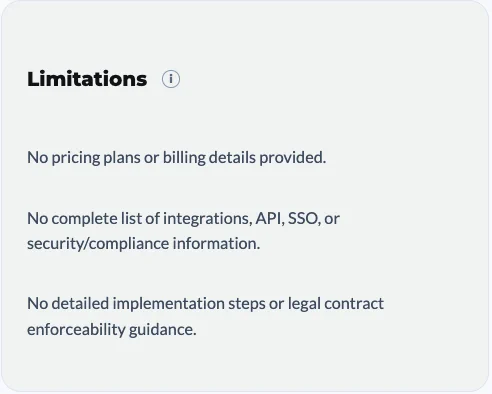
Finally, it mentions limitations in the content:
Now that we have a clear picture which prompts the page is set up to answer, and whether we should optimize the content, we can move on to tracking the prompt we are interested in getting cited for.
Step 5: Prompt Tracking
There are many tools that offer prompt tracking, and the functionality is similar to manual prompt tracking. You enter the prompt to various LLMs and notice whether your brand appears.
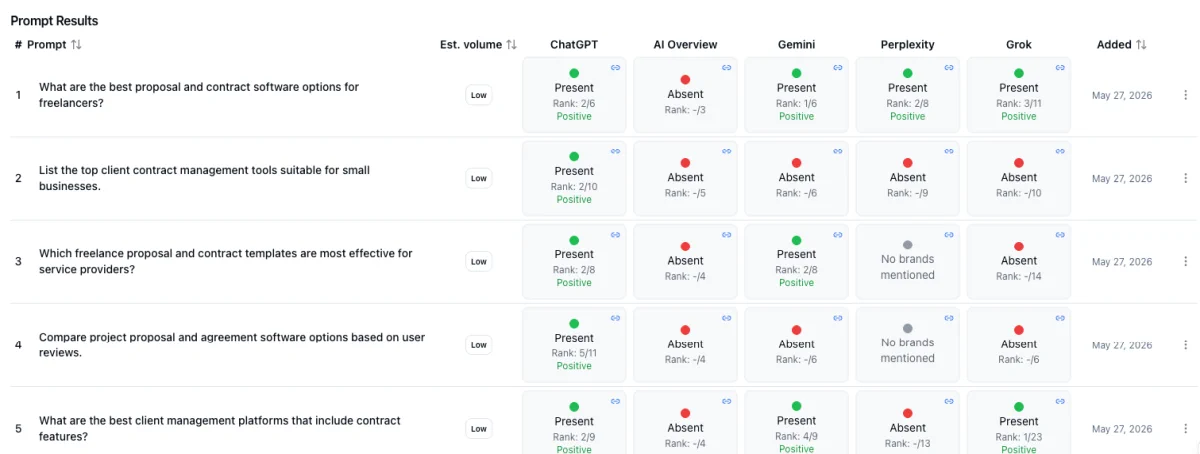
Prompt tracking is the least exact part of the loop. The goal is not a precise measurement. It’s to see whether the changes you made had an effect. You run your target prompt before you optimize, you run it again after, and you watch for movement. If the page starts showing up where it didn’t before, the work is doing something. That’s the signal you’re looking for, not a clean number.
You don’t need a tool for this. Open ChatGPT, Claude, and Perplexity, type your prompt, and write down whether your brand appears and where it sits in the answer. Do this for each prompt you care about, repeat it on a schedule like every two weeks, and keep the results in a simple sheet.
A tool automates this and saves time, but the method underneath is the same thing you can do by hand.
Treat the results as directional, not exact. LLM answers are not deterministic. Ask the same prompt twice and you can get two different answers, with your brand in one and gone from the next.
Answers also shift by account, location, model version, and whether web search is switched on. A single check tells you very little. What matters is the pattern across several checks over time. If you appear in most of them, that’s a real signal. If you show up once and never again, that was probably noise.
Step 6: Measuring the Difference in Analytics
Once tracking confirms the page is being cited, the question becomes whether that translates into traffic, leads, or conversions. This is where you connect the GEO loop back to outcomes the business actually cares about.
For HoneyBook, I’m watching three things in GA4:
Referral traffic from AI sources. Visits coming from chat.openai.com, claude.ai, perplexity.ai, and increasingly from Google’s AI overviews and Bing’s Copilot.
- AI-sourced sessions in the 30 days before the loop.
- AI-sourced sessions in the 30 days after.
Direct traffic uplift. A lot of AI citations don’t show up as referrals because users copy the recommendation, then type the domain into a browser directly. So a rise in direct traffic, especially with non-branded patterns, is often AI-driven even when the source attribution doesn’t show it.
Lead quality from these channels. The visitors arriving via AI sources came pre-qualified. They’d already read a summary of what I do, decided I was worth a look, and came specifically to confirm or convert.
Step 7: Agentic Browsing — Can an Agent Act on the Page?
Steps 1 through 6 are about getting cited: reachable, readable, complete, and relevant enough that an AI system quotes you. There’s a second front opening fast, and it’s worth checking on the same pages. A new wave of AI browsers (ChatGPT Operator, Claude computer use, Perplexity Comet, Edge’s Copilot Mode) doesn’t only read the web. It drives a real browser and operates pages to finish a task for someone: starting a trial, booking a call, filling in a form.
That’s a different question from citation, and a page can pass one while failing the other. The HoneyBook page I worked through this guide on is content, but the page it sends people to is the signup, and if an agent can’t complete that signup, the citation did its job and the page dropped the handoff. The usual culprits don’t show up in any of the earlier steps: the button that submits the form has no accessible name, a cookie wall sits in the way, a bot challenge blocks the door. The page renders fine for me; it’s a dead end for an agent.
Agentic Browsing checks exactly that. It runs on the rendered page an agent actually drives and answers three things: can the agent get in, can it perceive the controls, and is anything (a consent overlay, a modal) in the way. Then it returns a plain readiness verdict: Ready, Needs work, Read-only, or Blocked. It’s deliberately scoreless, a status and a pass-ratio, never a 0–100 number, and it never touches your AI Visibility Score. A content page with no actions comes back Read-only, which is correct. There’s simply nothing for an agent to operate.
Run it on the pages with an action (signup, checkout, booking, demo request), because that’s where a lost agent is a lost conversion. See What is Agentic Browsing for the full walkthrough, or the Agentic Browsing feature page.
Running the Loop on Your Own Page
Here’s what to do with one of your own pages this week:
- Run the audit. Use the free AI Readiness Report at beseenby.ai for a single page, or run a Website Audit in the app to check the whole site at once and pick the pages worth the loop. Fix any critical technical issues before moving on.
- Pick one target prompt. Use the three criteria above: specific, business-relevant, structurally matched to the page.
- Run Content Coverage. See where your page lacks the content it needs to get cited, and fix the important items first.
- Run Prompt Fit. Apply the recommendations, re-score, iterate until the page is genuinely a strong answer.
- Run Prompt Discovery. Note the Already strong cards (validation), the Close to winning cards (the closest wins — follow the recommended action on each), and the Needs content work / Gap cards (prompts the page doesn’t yet answer well, with concrete content actions to close them).
- Track Your Prompts (use any tool). Take your target prompt and your Already strong prompts into ChatGPT, Claude, and Perplexity. Record whether your brand appears and where. Run it before you optimize and again after, then on a schedule like every two weeks. Treat the results as directional, not exact.
- Check analytics. Compare AI-referral traffic, direct traffic, and lead quality before and after.
Then repeat the loop on your next page. Each page that completes the loop strengthens the citations the next page can earn.
Where to Go From Here
GEO isn’t a hack. It’s a loop you run on one page at a time until your site is doing the work AI systems need it to do.
If you’ve never run an audit, that’s the place to start: try the free AI Readiness Report. For deeper reading on each part of the scan, the How to Read Your AI Readiness Report guide breaks down every section in detail.