If you just ran an audit and it looks like a pile of technical jargon, that’s expected. This guide shows you how to read your results, starting at the dashboard for the whole site, then drilling into a single page’s report, what each part means, and what to fix first.
One thing upfront: the report is a diagnostic, not a grade. A low score does not mean you are invisible to every AI system. It means there are specific, findable issues, and that’s more useful than not knowing.
Start at your dashboard
You don’t read one report at a time anymore. When you open a project, you land on the dashboard, the whole-site view. It answers the first question that matters: across everything I’ve audited, how visible is my site to AI, and where are the problems concentrated?
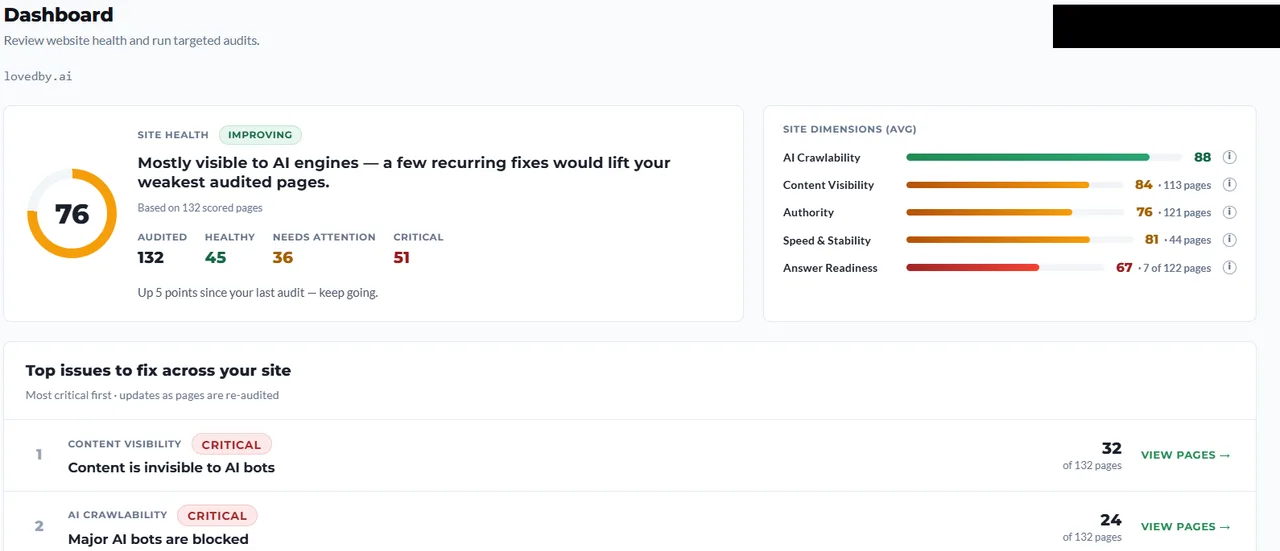 The dashboard rolls every audited page into one site health score, shows your weakest dimensions, and ranks the most critical issues first.
The site health score is an average across your scored pages, with a plain-language read on where you stand. Next to it, the per-dimension averages (AI Crawlability, Content Visibility, Authority, Speed & stability, and Answer Readiness) show which layer is dragging the site down. Answer Readiness appears once your pages have been analyzed for content; more on it below.
Below that, Top issues to fix across your site is the part to act on. Issues are ranked most-critical-first and grouped by how many pages share them, so “Content is invisible to AI bots · 32 of 132 pages” tells you a single fix pattern would lift 32 pages at once. That’s the whole point of the site view: fix by pattern, not page by page.
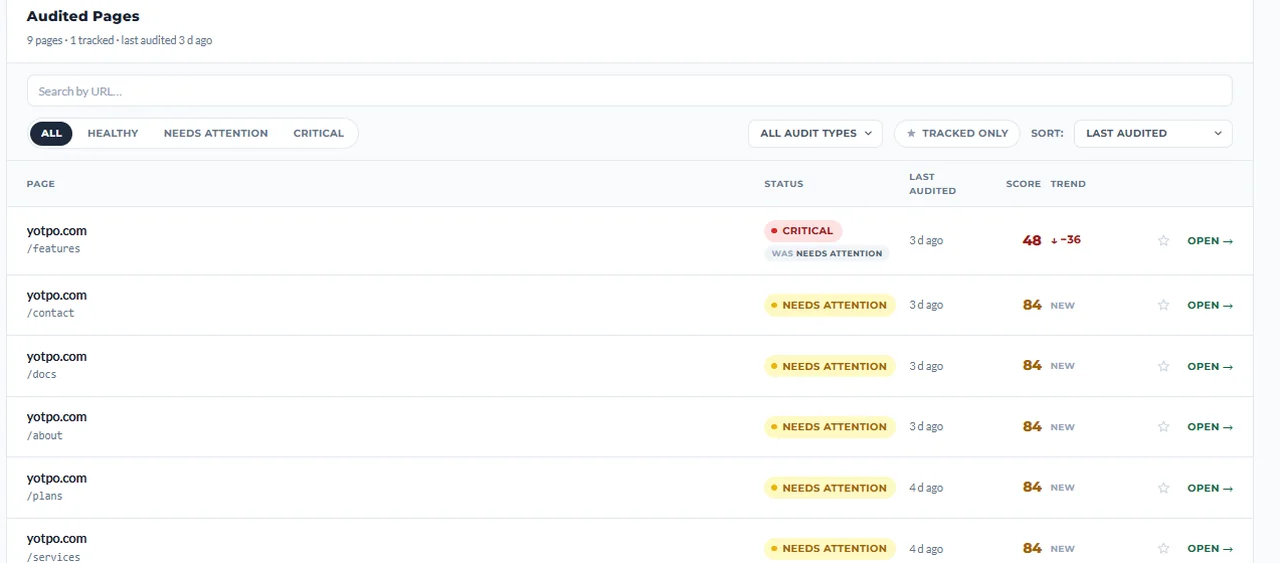 The Audited Pages list is your worklist. Sort and filter by status, watch the trend column after fixes, and open any page for its full report.
The Audited Pages list is your worklist. Each row shows the page’s status, score, and trend since its last audit. Filter to Critical to triage, or open any page to see the full report, which is where the rest of this guide picks up.
Opening a page report: the Overview
Open a page and you land on its Overview tab. Don’t read every tab first. The Overview tells you whether there’s a hard blocker, a few things to improve, or whether the page is broadly fine.
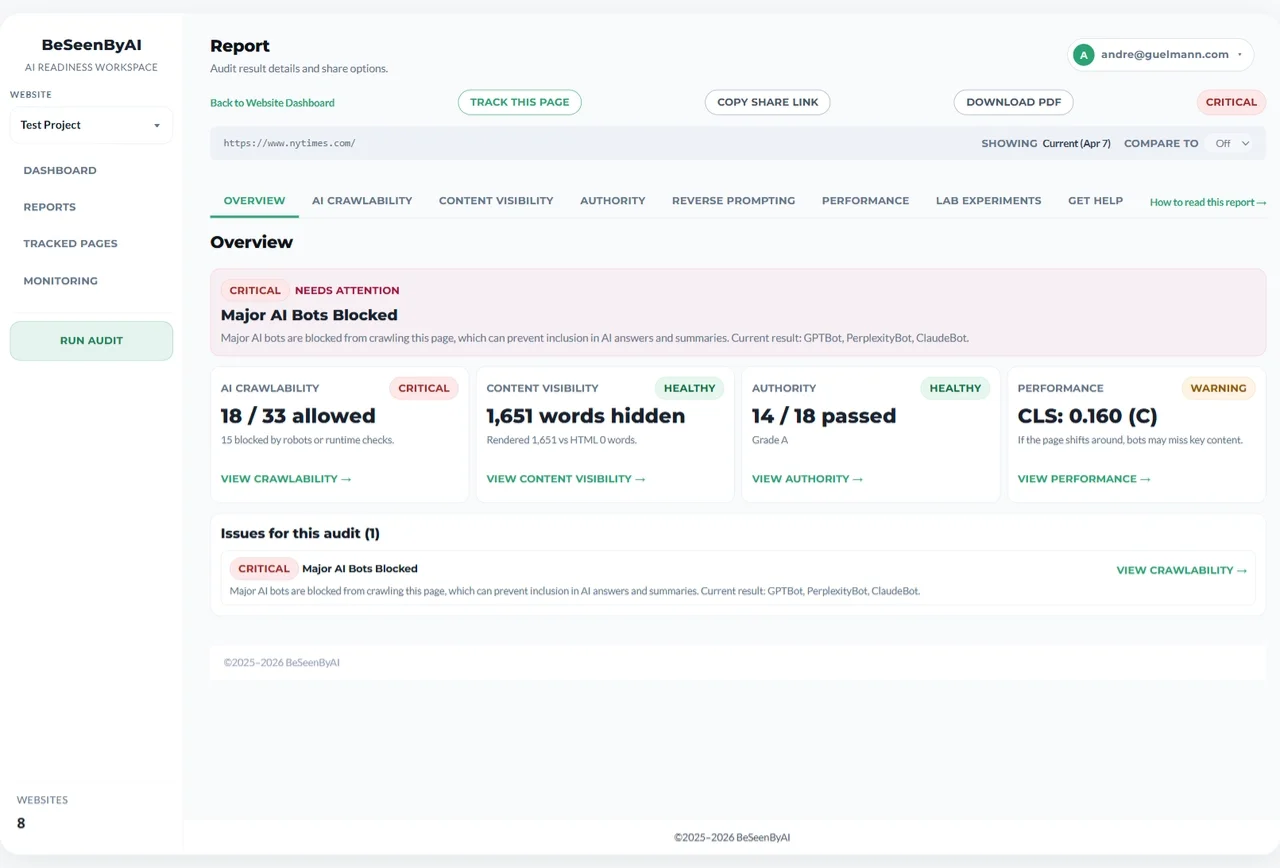 The Overview leads with a plain-language verdict, the AI Visibility Score, and a priority assessment that names the single most important fix.
Three things to read here:
- The verdict: one sentence naming the biggest problem and what to do about it. In this example, the server is too slow to respond (TTFB 1065ms), so that’s the primary blocker to fix before anything else.
- The AI Visibility Score (0–100) and status: the number, plus a status like Excellent, Needs work, or Critical. The status and verdict matter more than the number. This page scores 84, yet its verdict is still Critical, because a slow server response is a hard blocker that outranks a clean score everywhere else. The bars break the score into AI Crawlability, Content Visibility, Authority, Speed & stability, and (once the page has been analyzed for content) Answer Readiness.
- The Priority Assessment: the findings that matter most, ordered by impact, each linking to the tab with the details. Work from the top.
Below that, a section snapshot gives a one-line status for every dimension so you can jump straight to whichever tab needs attention. The tabs are: AI Crawlability, Content Visibility, Agentic Browsing, Authority, Content Coverage, Prompt Fit, Prompt Discovery, and Lab.
AI Crawlability: can bots reach the page?
This is the most binary issue in the report. If a bot can’t reach the page, nothing else matters. Great content and clean structure won’t help a crawler that never gets in.
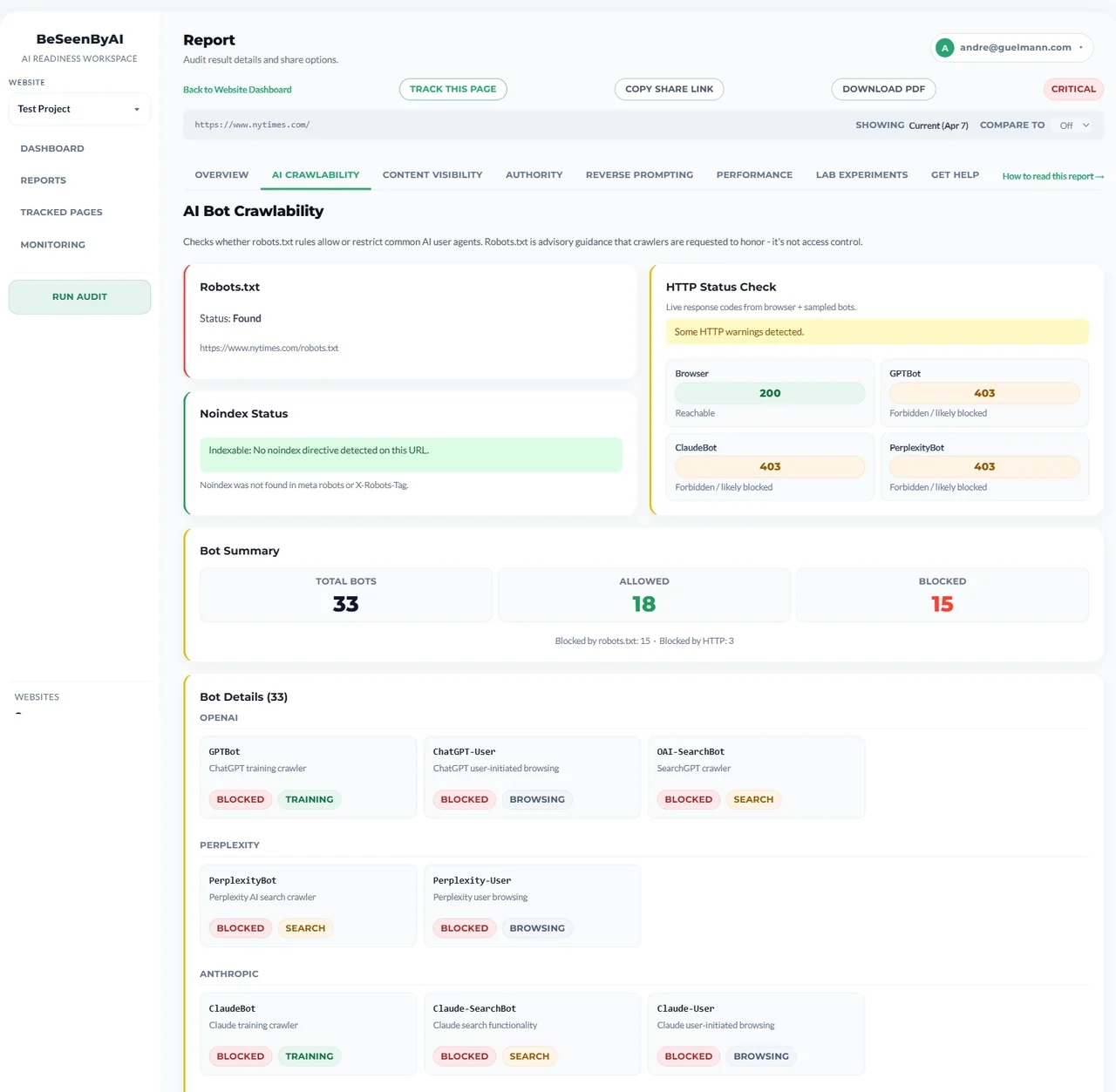 Crawlability separates what your site rules say from what actually happens when a bot sends a request. The second is where hidden blocks hide.
The tab separates two questions. Site rules: your robots.txt and any noindex directives. Live access: real fetch requests sent as the actual AI bot user agents. A page can pass robots.txt and still fail live access because of a WAF, CDN bot protection, rate limits, or a firewall. That gap, policy says allow, infrastructure says no, is the single most common hidden crawlability failure, and it’s invisible to a human browsing the site. Across our own audits, over 96% of these blocks never show up at the robots.txt layer at all, which is why checking live access matters as much as checking policy. See the full findings.
 The per-bot breakdown shows exactly which crawlers get through and which are blocked, and whether the block is in robots.txt or at runtime.
The per-bot view groups crawlers so you can make deliberate choices. Blocking training crawlers (GPTBot, Google-Extended, CCBot) is a legitimate choice. Blocking search and browsing agents (PerplexityBot, OAI-SearchBot, ChatGPT-User) is almost never what you want. Those are the bots that cite you when someone asks a live question. A blanket User-agent: * block often takes down both at once.
Response speed is checked here too, because a server that’s slow to respond is a less attractive source when an AI is assembling an answer under a time budget.
 TTFB (Time to First Byte) is the speed metric that matters most for AI retrieval. It lives in the Crawlability tab.
TTFB is the highest-leverage speed fix. Rough grades: A+ under 200ms, A 200–350ms, B 350–600ms, C 600ms–1s, D 1–2s, F over 2s. Past ~1,800ms, crawlers may time out before receiving a single byte. Server-side caching and a CDN are the usual fixes. See What is Crawlability and Why AI Can’t Cite You Without It for the full walkthrough, or the AI Crawlability feature page.
Content Visibility: what crawlers actually see
A fast, reachable page is still useless if its content only appears after JavaScript runs. Most AI crawlers fetch the raw HTML and do not execute JavaScript, so if your key copy is injected client-side, they see an empty shell. This is common: in our own audits, 70% of sites hide part of the page from AI, and for 1 in 10, more than half the page is gone.
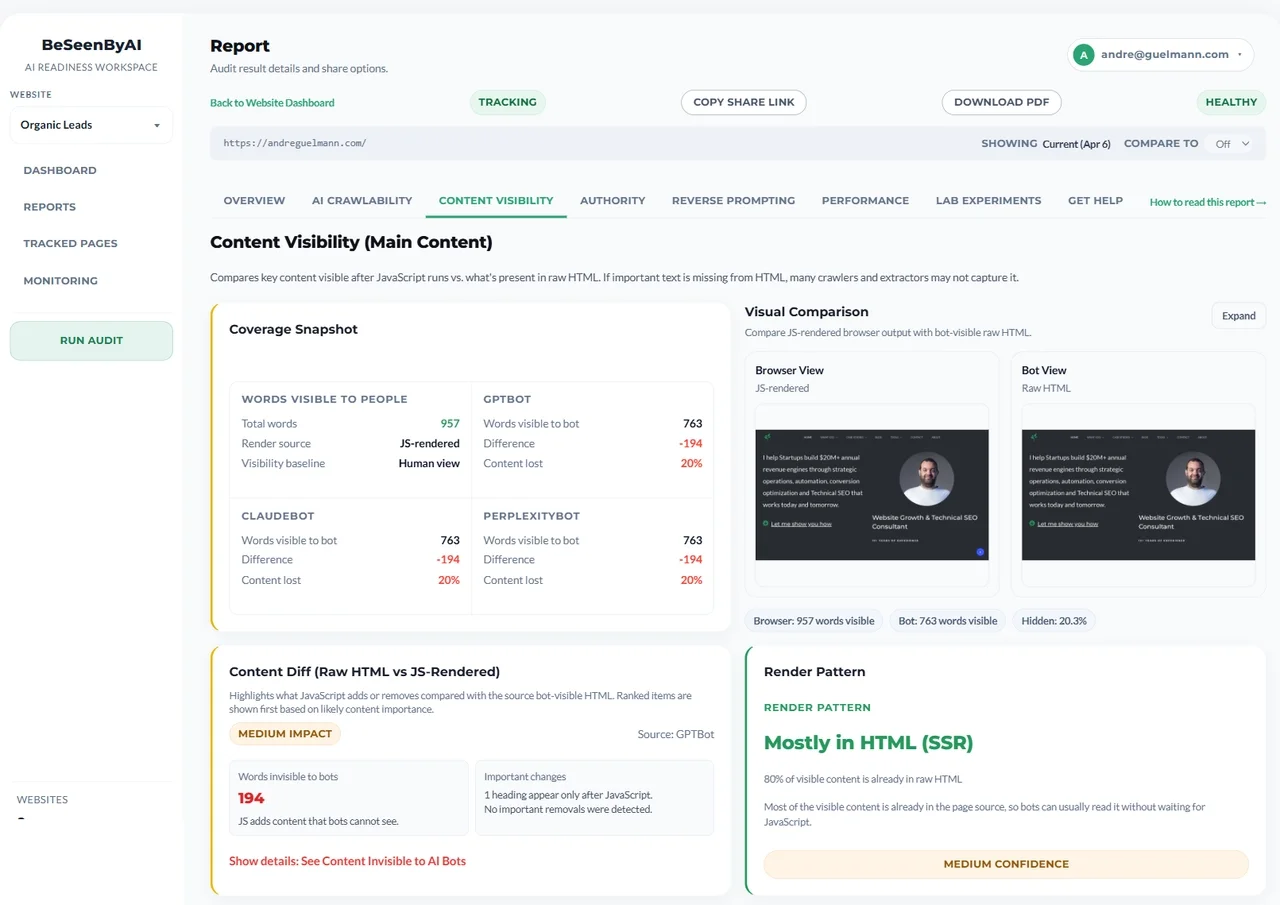 Content Visibility compares what a browser renders against what a bot reads from raw HTML, and flags the gap.
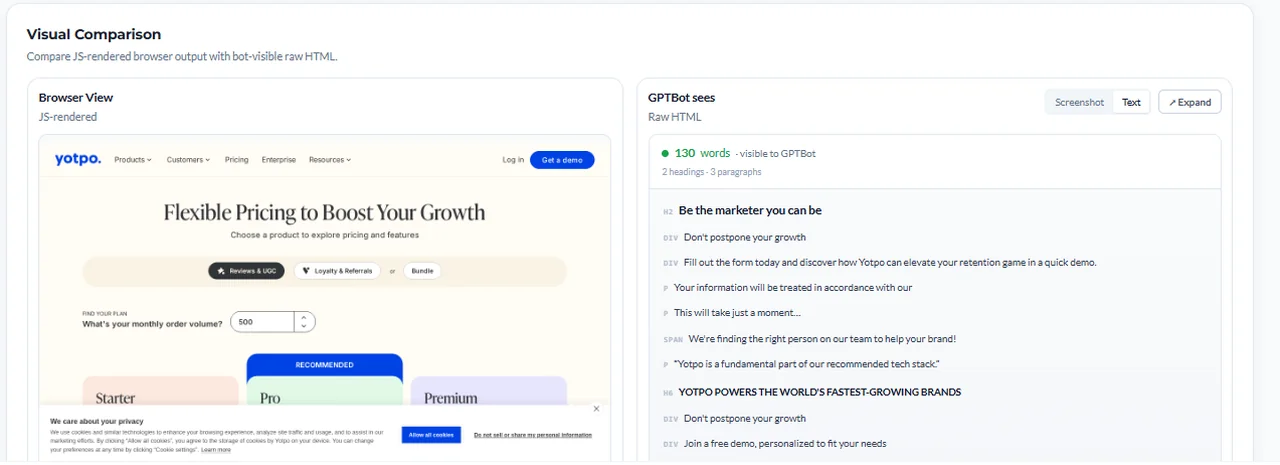 The visual comparison makes the gap concrete: a full pricing page for visitors, a near-empty shell for GPTBot.
The coverage snapshot compares word counts: here, 827 words visible to people versus 130 to GPTBot, an 84% gap. As a rule of thumb: under 5% is normal, 5–30% is worth investigating, and over 30% is a priority fix, especially if the missing text is your main content rather than navigation.
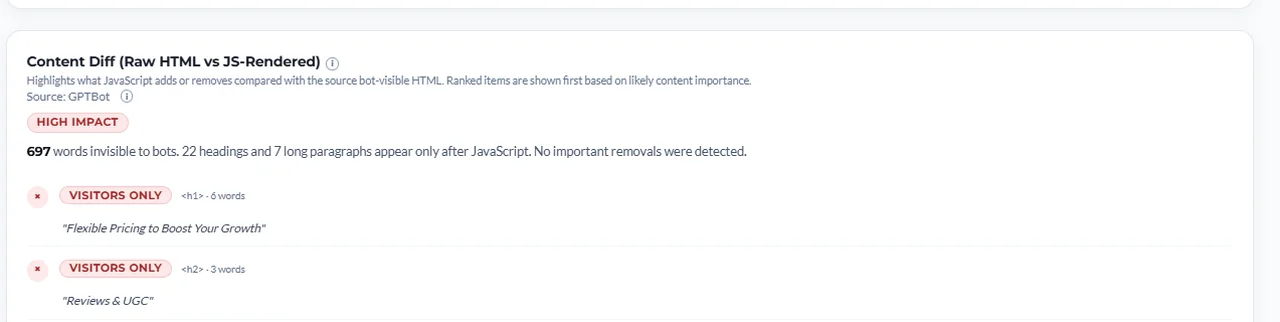 The Content Diff names the specific blocks bots can’t see, ranked by importance, so you know exactly what to move into the server-rendered HTML.
The Content Diff tells you which blocks are missing (the “Flexible Pricing to Boost Your Growth” heading, the FAQ, and so on), ranked by likely importance. The fix isn’t to stop using JavaScript; it’s to make sure the content that matters exists in the raw HTML response via server-side rendering, static generation, or pre-rendering.
 CLS and INP, layout and interaction stability, also live in this tab. They’re secondary to raw-HTML availability but still feed the score.
Two more speed-and-stability metrics surface here: CLS (how much the layout shifts while loading) and INP (how quickly the page responds to input). They’re secondary to TTFB and to raw-HTML content, but a stable page is easier to extract cleanly, so they still count toward the score. See What is Content Visibility? for the full walkthrough, or the Content Visibility feature page.
Agentic Browsing: can an agent operate the page?
Crawlability and Content Visibility ask whether an AI can reach and read the page. Agentic Browsing asks the next question, for pages with an action on them: can an AI browser agent (ChatGPT Operator, Perplexity Comet) actually operate it? The tab returns a plain readiness verdict (Ready, Needs work, Read-only, or Blocked) and a pass-ratio, and it answers three things: whether an agent can get in, whether the controls carry names it can target, and whether a cookie or consent overlay sits in the way. It’s deliberately scoreless. It never moves your AI Visibility Score, and a content page with no actions correctly comes back Read-only, not “failed.” See What is Agentic Browsing for the full walkthrough, or the Agentic Browsing feature page.
Authority: does the page look trustworthy?
Authority looks at the technical signals that make a page look complete and credible once it’s accessible: structured data, page-type clarity, and metadata. It does not measure backlinks, domain authority, or content quality. These gaps are widespread: in our own audits, 68.9% of sites are missing sameAs profile links, and nearly 1 in 5 have no structured data at all.
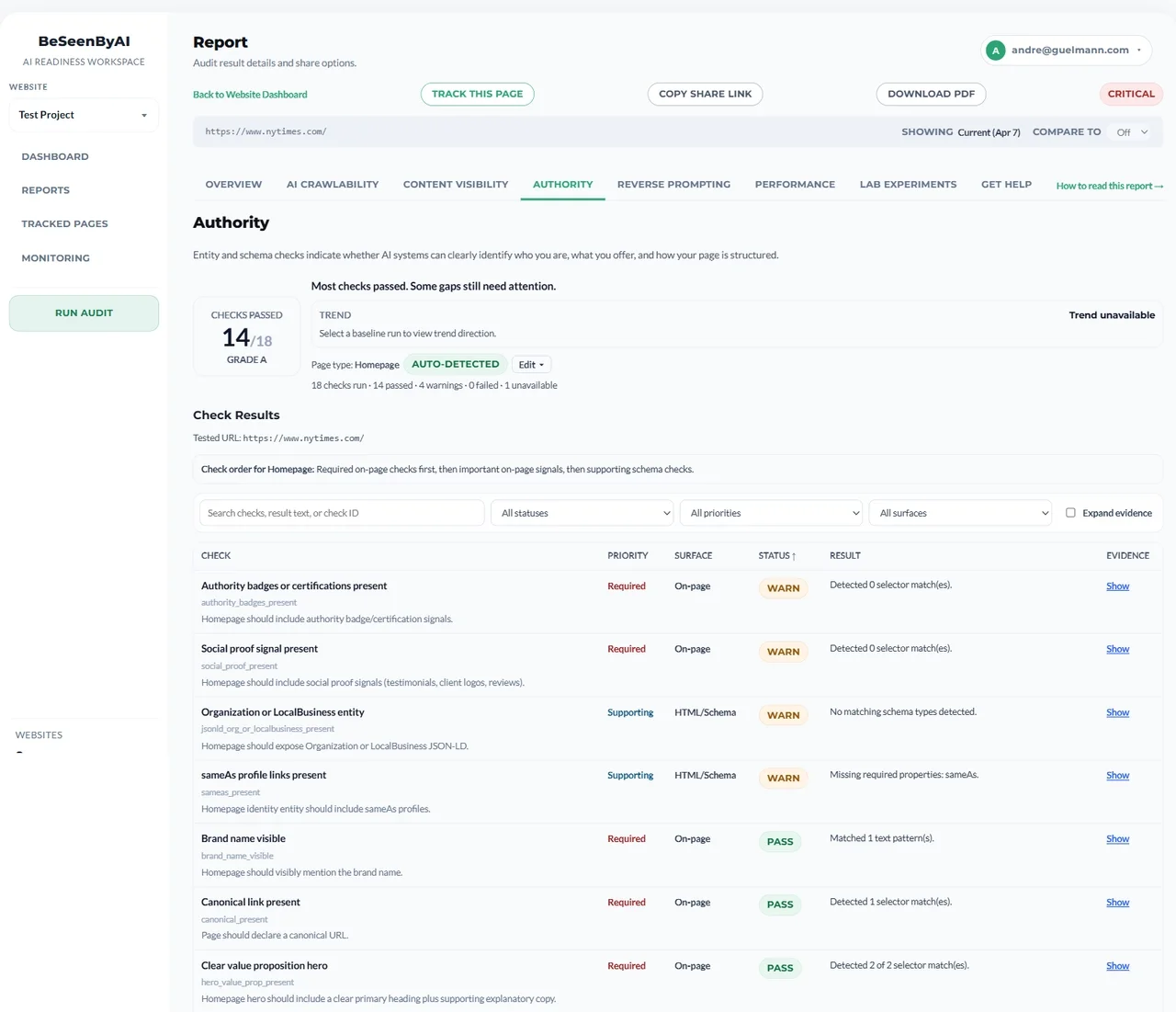 Authority checks schema, structure, and metadata, the signals AI systems use to understand what a page is and whether to trust it.
The tab auto-detects the page type (article, product, homepage, and so on), which decides which checks apply, then grades the page across schema validity (JSON-LD), semantic structure, and metadata completeness. Treat the grade as directional. It shows where technical credibility is weak, not whether you’ll be cited. See How to Use the Authority Check for the full walkthrough, or the Authority feature page.
Content Coverage: does the page explain its topic completely?
Crawlability, content visibility, and authority all ask whether AI systems can reach and read the page. Content Coverage asks the next question: once they can read it, is there enough here to use? A page can be reachable, visible, and technically clean and still be a weak source because it touches its topic without answering the questions readers actually ask, so an AI system builds its answer from someone else and cites them instead.
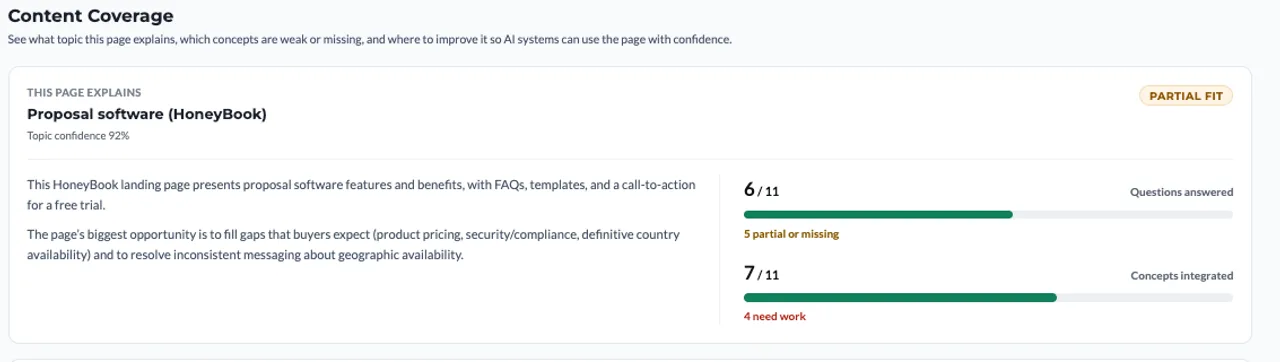 Content Coverage names the topic the page explains, scores how confident it is in that read, and measures completeness two ways: questions answered and concepts integrated.
The tab works out the single topic the page is explaining (with a confidence score), then measures completeness two ways: how many of the questions a page on that topic should answer it actually resolves, and how many of the core concepts it integrates. Below that, a ranked list of priority improvements names the few changes most likely to make the page easier for AI systems to understand, summarize, and cite, each marked Important or Minor. None of this shows up in a technical scan, because the page renders fine; the gap is in the content itself. Content Coverage runs on every paid plan.
Content Coverage is also what produces the Answer Readiness score: the fifth dimension on the dashboard and the Overview. Where Content Visibility asks can AI read the page?, Answer Readiness asks can the page answer AI’s questions? It’s the rolled-up read on how completely your pages cover their topics: it appears once a page has been analyzed, and once enough of your pages are covered it factors into the overall score. See What is Content Coverage and How to Use It for the full walkthrough, or the Content Coverage feature page.
Prompt Fit: can the page answer a specific question?
Crawlability and content visibility ask whether a page can be read. Prompt Fit asks whether it can answer. You give it a real question, and it grades how cleanly your page backs up the answer.
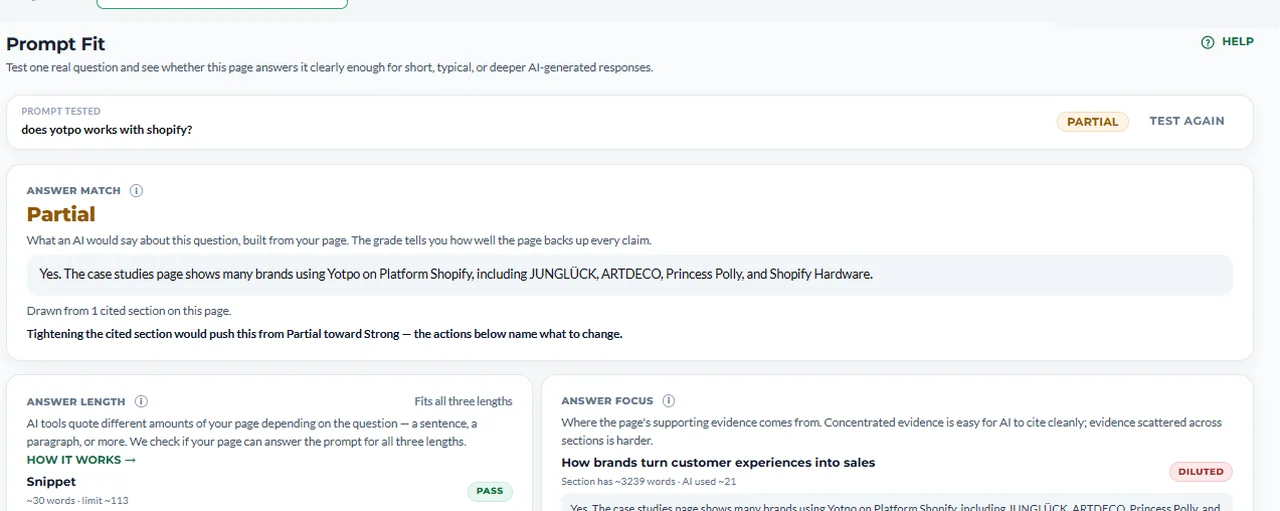 Prompt Fit shows the answer an AI would assemble from your page, grades how well the page supports it, and points to what to tighten.
You get the answer an AI would build from your page, a match grade (Weak, Partial, or Strong), and a breakdown: whether the page can answer at snippet, summary, and in-depth lengths, and whether the supporting evidence is concentrated or scattered across sections. The “what to do” list names the specific edits that would move a Partial toward Strong. Prompt Fit is available on every paid plan. See What is Prompt Fit and How to Use It for the full walkthrough, or the Prompt Fit feature page.
Prompt Discovery: what is this page already good at?
Prompt Fit tests the question you chose. Prompt Discovery asks the inverse: given this page’s content, what questions is it already positioned to answer, including ones you didn’t target?
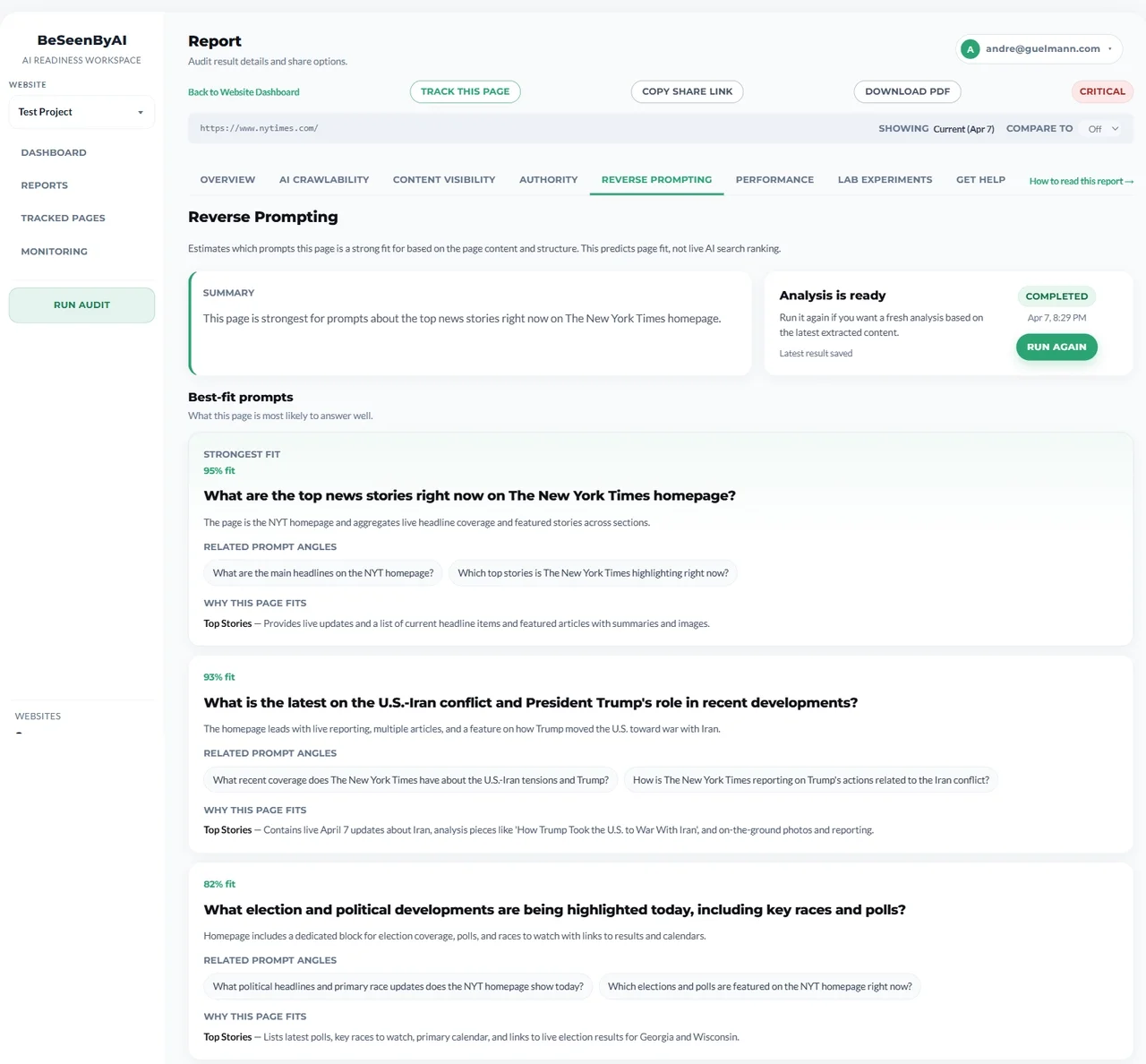 Prompt Discovery surfaces a ranked list of realistic prompts: what the page already wins, what’s close, and where the gaps are, each with a recommended action.
It surfaces a ranked list of realistic prompts grouped by tier: Already strong (protect these), Close to winning (the fastest wins, each with a recommended edit), and Needs content work / Gap (prompts the page doesn’t yet answer). Each links into Prompt Fit so you can validate it end-to-end. It’s directional, not a ranking predictor. Treat it as content strategy input. See What is Prompt Discovery and How to Use It for the full walkthrough, or the Prompt Discovery feature page.
Lab: exploratory signals
The Lab tab holds experimental checks that don’t affect your grade: things like llms.txt detection and an HTML-vs-Markdown representation comparison.
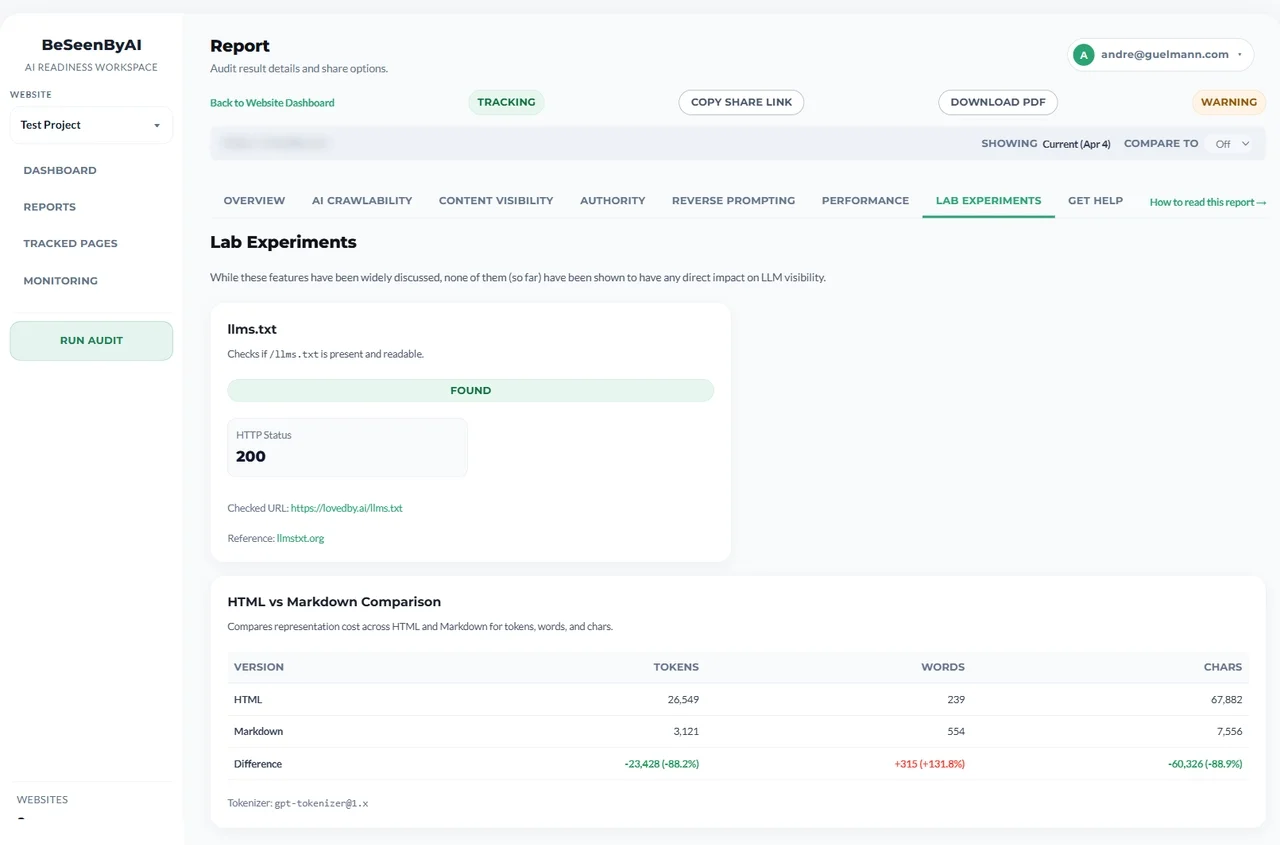 Lab is for edge signals we’re still validating. Useful for exploring, but not items to prioritize over the core tabs.
Treat these as hypothesis-generating, not fix-first. When a Lab signal matures, it graduates into the relevant core or prompt section.
History and re-auditing
Every audit of a page is saved to its History tab, newest first, with the score change versus the previous run. After you ship a fix, re-audit and the numbers should move: TTFB dropping, a content gap closing, a blocked bot clearing. On the Agency plan, monitoring can re-audit tracked pages on a schedule and alert you when something changes, but the core loop is simple: audit, fix, re-audit to confirm.
What to fix first
Most pages have issues in one or two layers, not all at once. When there are several, this order works for most sites:
- Severe TTFB. If TTFB is over ~1,800ms, crawlers may time out before reading anything. Fix this first; it can make everything else moot.
- Crawlability blockers. If major AI bots are blocked in
robots.txtor at the WAF/CDN, there’s no point optimizing a page crawlers can’t reach. - Critical content visibility gaps. If your main content only loads via JavaScript (a gap over 30%), most crawlers won’t see it.
- Authority. Weak schema, broken structure, or thin metadata. Fix after access and visibility are solved.
- CLS and INP. Lowest priority for AI access specifically; address once the bigger issues are resolved.
Content Coverage, Prompt Fit, and Prompt Discovery come after the page is reachable and readable. There’s no point improving the content or tuning an answer to a question if the crawler can’t open the page.
For those content-side tabs, and for the schema fixes in Authority, you don’t have to write the fix yourself. Optimizations turns each gap into a drafted fix built from the content already on your page, flagging any fact the page didn’t supply so you confirm it rather than invent it. Paste it in, re-audit, and watch the numbers move.
After you make changes
Re-run the audit and compare. A fix that works shows up in the data, and on the dashboard, the site health score and the affected pages’ trends move together. Treat auditing as an ongoing check rather than a one-time test: new frameworks, robots.txt edits, and server migrations all introduce fresh issues over time.
Next steps
Run your first audit: Check any URL →
Audit your whole site: See plans →
Need help with a specific metric? Browse the help docs →