Most pages aren’t written for LLMs. They’re written for humans browsing, scanning, and clicking, which is a different reading pattern entirely. A human can scroll past a hero section, ignore a testimonial, skim a feature grid, and still leave with the gist.
An LLM doesn’t browse. It reads the page as a structured document inside a fixed token budget, pulls the chunks it thinks are relevant to a query, and either has enough to cite you or doesn’t.
That mismatch is what Prompt Fit was built for.
The Problem With Optimizing Pages by Feel
When you write a page, you usually have a mental list of things it should communicate. For a kitchen gifts page, for example, that list might look like:
- What we sell
- Why we’re a good choice
- What the price range is
- Who it’s for
- What makes us different from the generic Amazon version.
You write the page, you think you covered it all, and you move on.
But you are likely missing a vital step. The information might technically be on the page. It might also be spread across five different sections, so when an LLM chunks the page it never sees the full answer in one place. Phrased so generically that the model can’t tell what makes you specifically worth citing. Buried under marketing copy that signals brand voice to a human and skip this to a model. Missing entirely, even though you’d swear it was there, because what you actually wrote was a vibe rather than an answer.
You can’t see any of this by reading your own page. You wrote it. You know what it’s supposed to say, so that’s what you read when you look at it.
Prompt Fit reads your content the way a model would, against a specific question, and tells you whether the answer is actually there.
Not Another Content Analysis Tool
There are plenty of tools that will tell you if your content is “good.” They look at readability, tone, keyword coverage, sentiment, maybe whether your headings sound compelling. Useful for human readers, mostly irrelevant to whether an LLM can cite you.
Prompt Fit starts somewhere else entirely. It starts with the technical reality of how an LLM ingests a page.
A model has a token budget for any given query. It doesn’t read your whole page and form an opinion. It pulls chunks, ranks them, and decides whether any single chunk is dense enough, specific enough, and structurally clean enough to be worth citing back to the user. If your answer to a question is split across three sections, no chunk contains it. If your pricing is buried inside product cards instead of stated as a range, no chunk has the number. If your “why us” points are scattered through brand-voice paragraphs, no chunk reads as a clean answer.
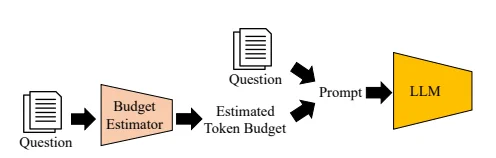
This is the layer Prompt Fit operates on. Token budget, chunking behavior, structural signals, answer density, extractability. It tells you whether the page is mechanically built to be cited before it asks whether the writing is any good. The qualitative stuff matters too, but it’s downstream. If the chunking is broken, no amount of polish on the prose fixes it.
This is also why Prompt Fit gives you optimization actions rather than a content score. The findings map to specific structural edits needed.
Limitations of LLMs
When a user asks an AI a question, the AI searches your page for the answer, then decides whether to cite it based on the length of the text it finds. Prompt Fit runs that process on your actual content and shows if your text can fit into this budget.
LLMs have a space problem, only having room for a limited amount of words they can read and use in a response (their token budgets). Answers that are too long and/or are split into different sections become harder to use even if the information is technically there and looks relevant.
The first limit is relevant during retrieval. LLMs never read full pages; their content is split into sections (chunks) of ~256–800 tokens (~200–600 words, depending on the LLM and prompt type) and these sections are then used to build an answer if they are relevant. You can check where your own page’s sections would get cut with the free Content Chunking Checker.
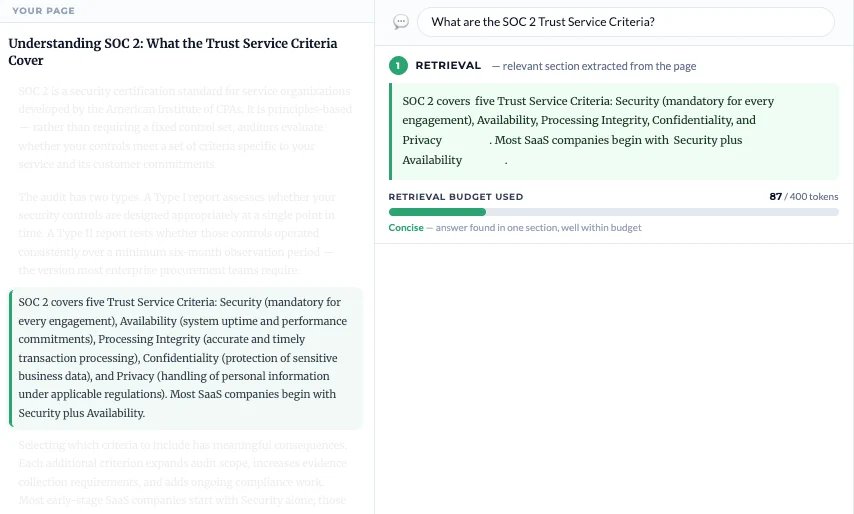
In the image above the LLM found a relevant chunk totaling just 87 tokens — well within the 400-token limit — and since it was tight and self-contained, it made extraction easier.
The second limit relates to citation. Finding the content isn’t enough. LLMs also have a citation budget, depending on the type of answer they want to give: short Snippets get ~150 tokens (~110 words), Summaries get ~350 tokens (~250 words) and In-depth answers get ~600 tokens (~450 words). You can check a specific answer against all three with the free Token Budget Calculator.
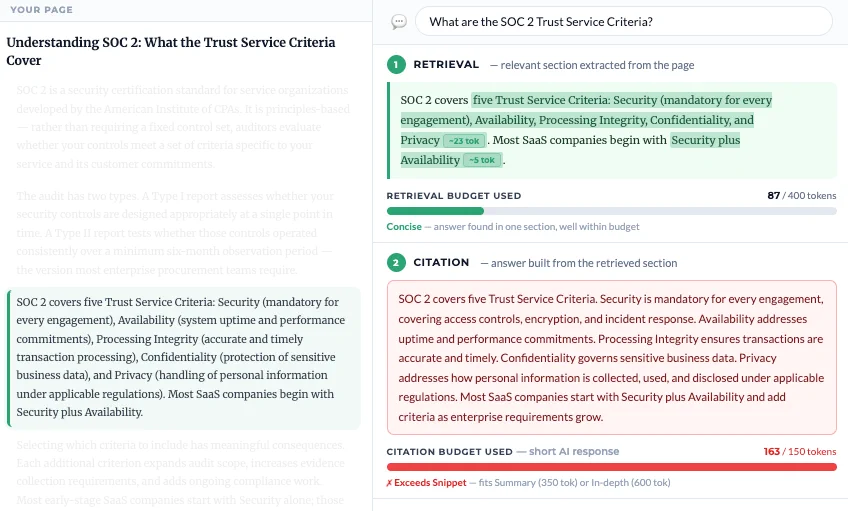
Here the page content contains one relevant section that was extracted, but the answer it gave didn’t fit the citation budget. The AI needed 163 tokens to synthesize an answer, exceeding the 150-token Snippet limit.
The answer fits within the Summary tier (350 tokens), meaning it can still appear in longer AI responses. But AI tools generating short Snippet answers, the most common response format, will skip this page entirely.
Prompt Fit shows you that a quality judgement is not enough. If your content doesn’t pass this budget check, no amount of optimization will make it visible on AI.
You give Prompt Fit a page and a target prompt. It scans the page the way an LLM would, using our own trained LLM models, looking for the text length, structure, and signals that would make this page a good citation for that specific query. Then it returns a fit score and a breakdown of what’s working and what’s missing.
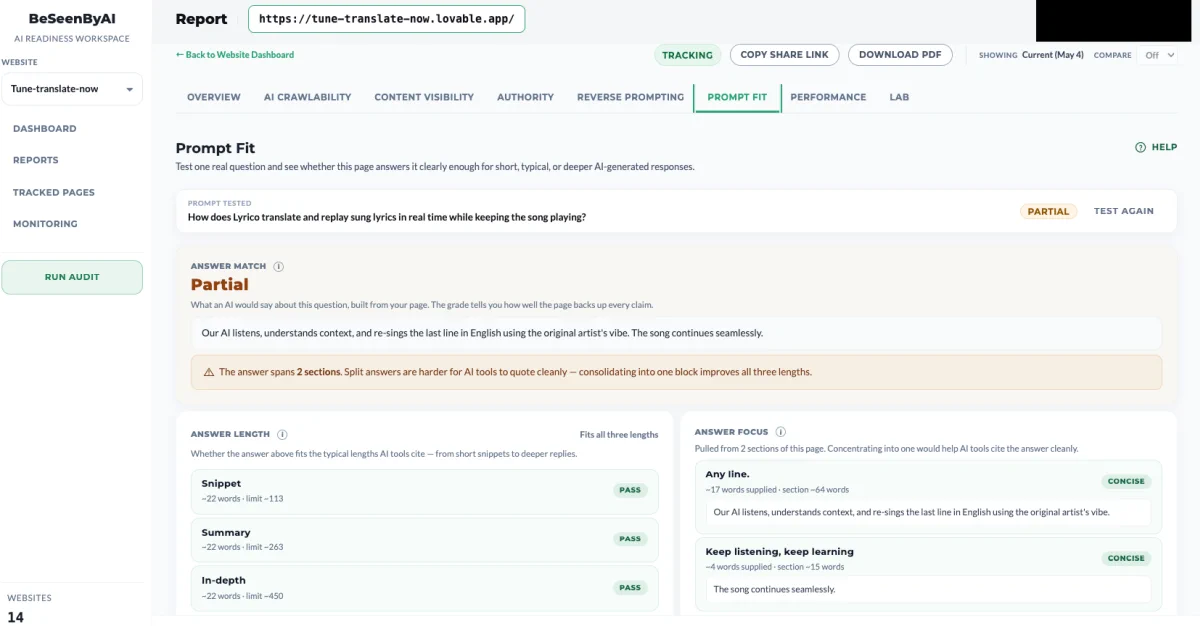
Prompt Discovery tells you what queries your page is broadly positioned for. Prompt Fit zooms in on one of them and tells you exactly how well the page answers it.
A kitchen gifts page has multiple intentions baked into it. Someone might land on it from a query like “what does BrandName offer in terms of kitchen gifts,” or “why buy BrandName kitchen gifts,” or “what’s the price range of kitchen gifts at BrandName,” or “best kitchen gift under $50.”
These are all different questions. The page might answer one of them perfectly, two of them partially, and the fourth not at all, even though a human reading the page would say it covers everything.
Prompt Fit lets you check each one separately.
How to Use It: The Full GEO Loop
Prompt Fit is most powerful when you use it as part of a competitive loop, not as a standalone scan. Here’s the full process.
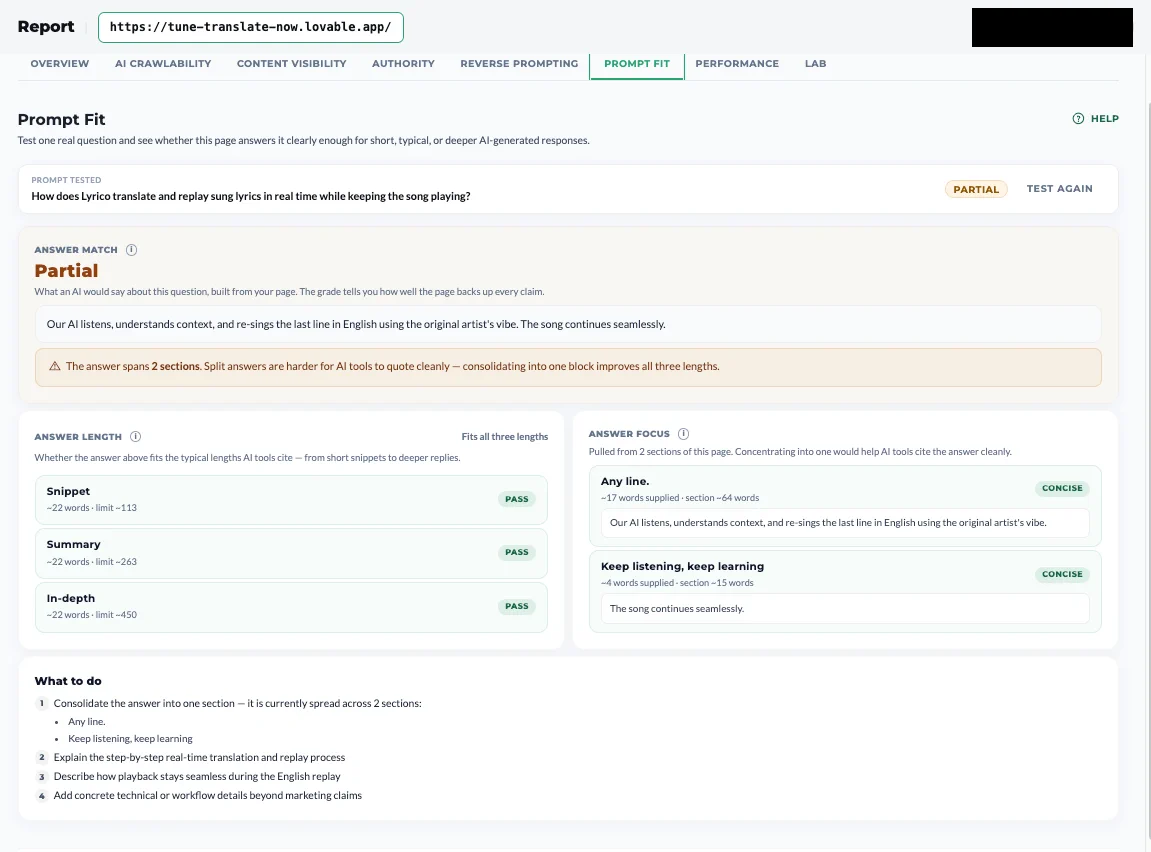
Let’s use Prompt Fit to examine HoneyBook’s proposal software landing page.

Step 1: Run Prompt Fit on your page against its core intention.
Start with the prompt your page is actually meant to win. For a proposal-software landing page, that’s something like “best proposal software for freelancers?” Run it. You’ll get a verdict and a breakdown of what the page is doing well and where it’s weak. Here the page lands on Partial — it answers the question, but not cleanly enough to be the obvious citation. That’s your baseline.
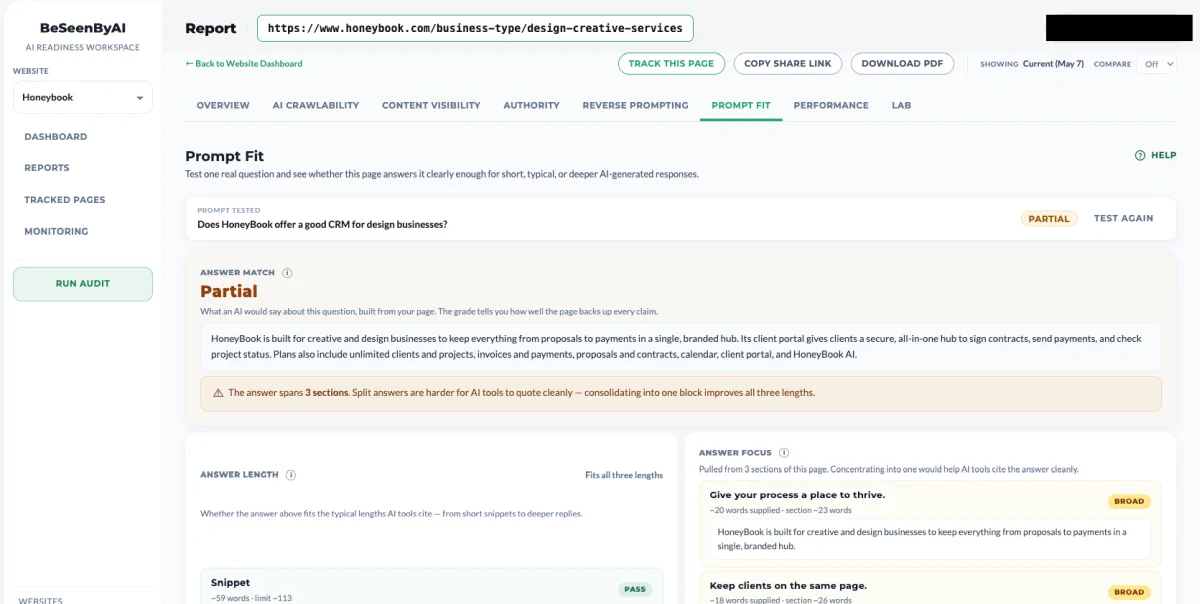
Step 2: Understand the Answer Match
The Answer Match shows what an AI would say about the question, built from your page, and grades how well the page backs up every claim. Here the drafted answer is solid, but a note flags that it’s pulled from two separate sections — split answers are harder for AI tools to quote cleanly.

Step 3: Make sure the answers are at the right length
The next section checks whether the answer fits the lengths AI tools actually cite: Snippet (the shortest), Summary, and In-depth (the longest). On this page the answer is concise enough to pass all three, so length isn’t the blocker here — when a tier fails, it’s usually because the answer runs longer than that citation budget allows.
Step 4: Read through the Answer Focus
Answer Focus shows whether the evidence is concentrated in one clear place or spread across the page. Focused answers are easier for AI systems to reuse cleanly.
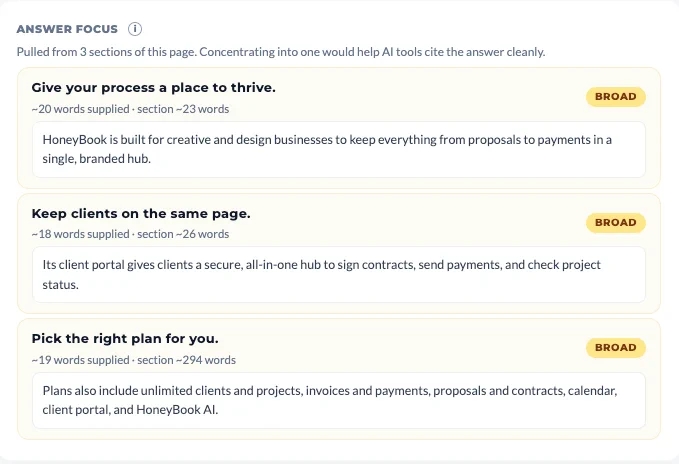
In our example, the answer is spread across two sections. Concentrating them into one would help AI tools cite the answer more easily.
Step 5: Implementation plan - The What to Do section
The final section turns the findings into actionable steps to increase the chances the page is cited for the prompt you tested.
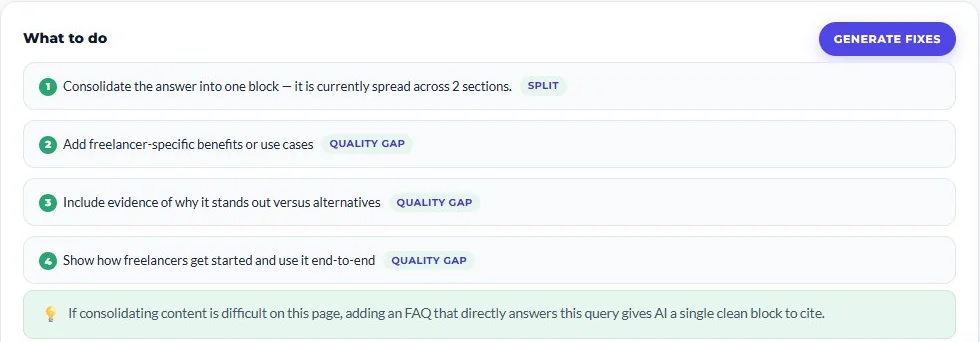
In our example, the recommendations are to:
- Consolidate the answer into one block — it is currently spread across two sections.
- Add freelancer-specific benefits or use cases.
- Include evidence of why it stands out versus alternatives.
- Show how freelancers get started and use it end-to-end.
You don’t have to turn those steps into copy yourself. When you’re ready to act, Optimizations drafts the rewritten section from the content already on your page — consolidating the split answer, filling the stated gaps, and flagging any fact the page didn’t supply so you confirm it rather than invent it.
When to Use It
Here are some common use cases ideal for checking Prompt Fit:
- Page that doesn’t get cited - When you have a page that should be getting cited and isn’t, and you need to know whether the problem is the content, the structure, or the fact that the answer was never really there.
- Targeting a high value query - When you’ve identified a high-value query through Prompt Discovery and you want to close the gap on it specifically.
- General optimization of a page - When competitors are getting cited for a query you should be winning, and you need to see what they’re doing structurally that you’re not.
Start Using Prompt Fit
Prompt Fit is the closest thing to a direct optimization loop in GEO. You pick a query, you scan the page, you scan the competitors, you fix what the gap surfaces, and you re-check. No coin flipping, no waiting for prompt tracking variance to settle, no guessing at why a model didn’t cite you. The page either answers the question or it doesn’t, and Prompt Fit tells you which, and what to do about it.